

Understanding the affiliate journey
The affiliate journey is the path a partner takes through your program. They sign up, get approved, receive a link and code, promote you, drive sales, and earn a commission. Seeing it from their side helps you build a program partners want to promote. A confusing sign-up, a low commission, or a slow payout each loses partners at a different step.
This page explains the experience, not the setup. For setup, see How to launch an affiliate program.
The work splits in two. Promotion happens on your partner’s channels. Approving and paying happen on yours.
flowchart TB
    subgraph P["Your partner"]
        A1["Applies, or you add them"]
        A2["Gets a link and an optional coupon"]
        A3["Promotes to their own audience"]
        A5["Gets paid"]
    end
    subgraph S["You"]
        B1["Approve them into a campaign"]
        B2["Review the sale"]
        B3["Record the payout"]
    end
    A1 --> B1
    B1 --> A2
    A2 --> A3
    A3 -- "an order lands inside the cookie window" --> B2
    B2 --> B3
    B3 --> A5
    A5 -. "keeps promoting" .-> A3
Who the affiliate is
Section titled “Who the affiliate is”An affiliate is an outside partner: a creator, blogger, publisher, or any promoter with an audience. They don’t need a prior order with you. They bring reach you can’t build alone. In return, they expect a commission that makes promotion worth their time, and a payout they can rely on. Affiliates earn only on the orders they drive.
Step 1: The affiliate applies or is invited
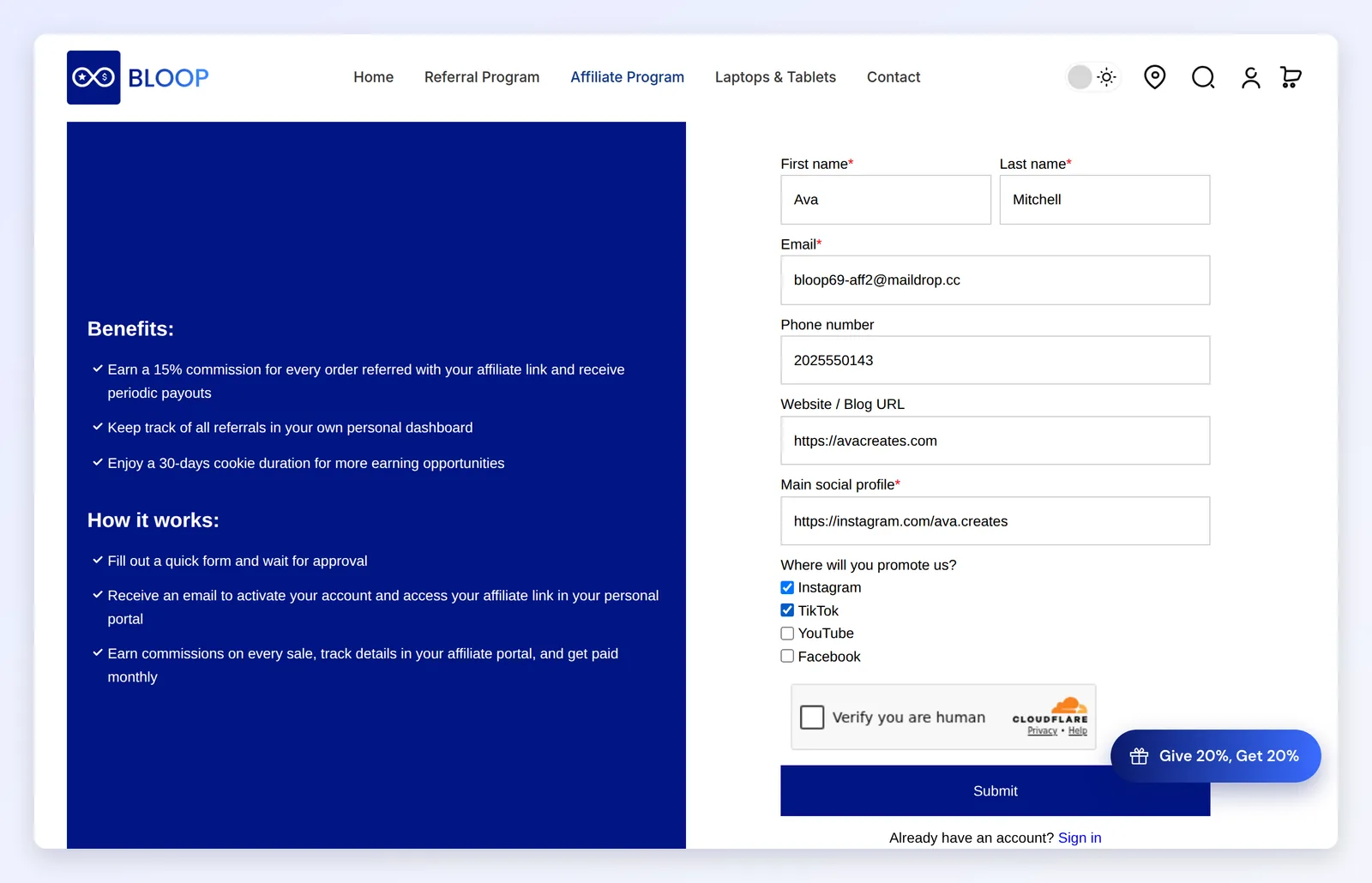
Section titled “Step 1: The affiliate applies or is invited”A partner joins in one of two ways. They register through your form and wait as pending, or you add them manually with a name and email. Your registration form is the first impression. A clear form and a clear reason to join decide whether good partners apply. See Managing affiliates.
Step 2: You approve them
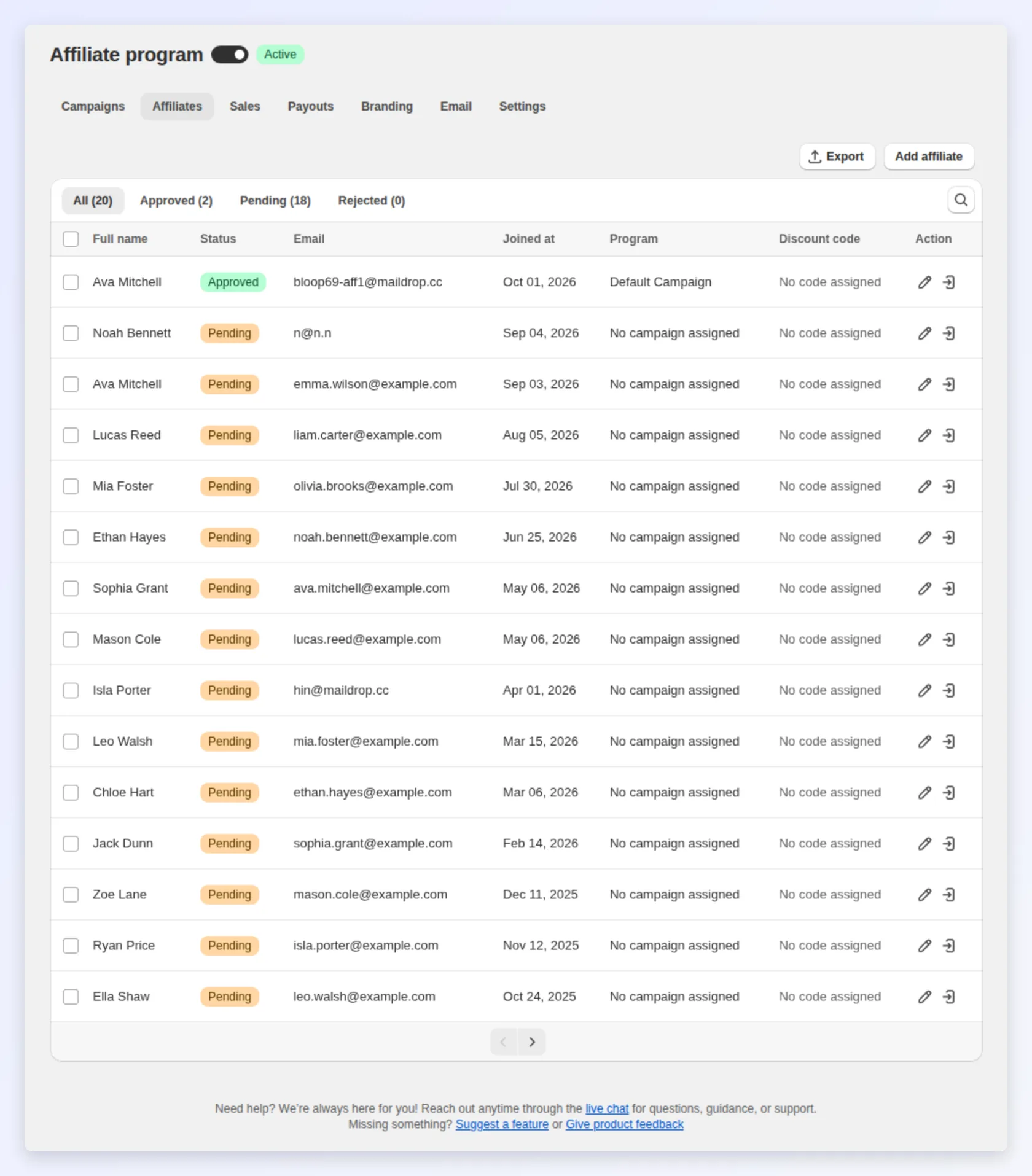
Section titled “Step 2: You approve them”Before an affiliate can earn, they need approval and a campaign. The campaign sets their commission and cookie window. Review each application yourself, or approve every sign-up automatically with Affiliate approval automation in affiliate settings. Put different partners in different campaigns to protect your margins. See Affiliate campaigns and commissions.
Step 3: The affiliate receives their link and code

Section titled “Step 3: The affiliate receives their link and code”Each approved affiliate gets a unique referral link and, optionally, a coupon. The link attributes orders to them. The coupon gives their audience a reason to buy now. They log in to their portal for materials and results.
Step 4: The affiliate promotes you
Section titled “Step 4: The affiliate promotes you”The affiliate shares their link and code in posts, videos, newsletters, and reviews. This happens on their channels, and it is the work you pay for.
Step 5: A customer buys and a sale is recorded
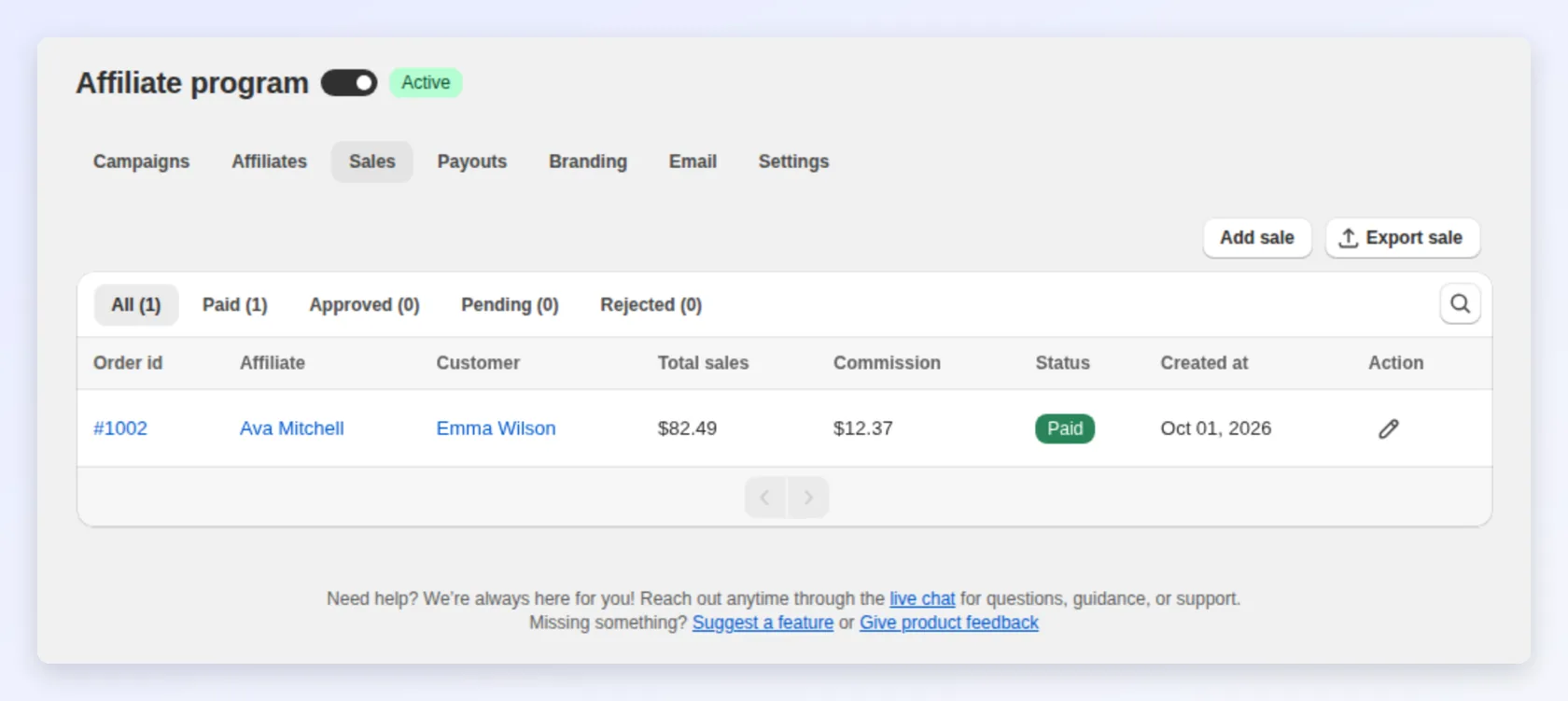
Section titled “Step 5: A customer buys and a sale is recorded”When a customer clicks the link and completes a qualifying order within the cookie window, Bloop records a sale and calculates the commission from the affiliate’s campaign. The sale is created when the order is paid, or at fulfillment if you prefer. See Order Settings. You review the sale, and the affiliate sees the pending earning in their portal. See Affiliate sales tracking.
- Unpaid orders create no sale until they are paid, for example cash on delivery or bank transfer. The exception is if your order settings create sales at fulfillment.
- Self-referrals stay pending. If the buyer’s email is the affiliate’s own, the sale is created as Pending with a self-referral note. It is never approved automatically. Check it yourself before you approve.
Step 6: You approve the commission
Section titled “Step 6: You approve the commission”Review each sale. Approve the valid ones and reject the rest. Approving moves the commission into the affiliate’s balance as money owed.

- Cancellations and full refunds: while the sale is unpaid, Bloop revokes the commission and shows the affiliate why.
- Partial refunds: the commission is not revoked. While the sale is unpaid, Bloop recalculates it on the amount the customer kept.
- Paid commissions: never revoked or recalculated. If you approve orders immediately instead of reviewing them, a commission can reach a payout before your return window closes, so wait out the return window before you pay.
Every commission moves through four states. Use this map when a partner asks where their commission is.
stateDiagram-v2
    [*] --> Pending: order paid (or fulfilled) inside the cookie window
    Pending --> Approved: you approve it
    Pending --> Rejected: you reject it, or the order is cancelled or fully refunded
    Approved --> Rejected: the order is cancelled or fully refunded
    Approved --> Paid: included in a payout you record
    Rejected --> Pending: you mark it pending again
    Paid --> [*]
Step 7: The affiliate gets paid
Section titled “Step 7: The affiliate gets paid”An approved commission is paid through the method the affiliate chose in their portal. Until they choose one, the payout is blocked. You pay them through your own bank or PayPal, then record the payment in Bloop. The amount moves from their balance into their payment history.

On-time payouts are the biggest reason affiliates keep promoting and recommend you. See Affiliate payouts.
How the journey shows up in your dashboard
Section titled “How the journey shows up in your dashboard”Each step leaves data: applications, approvals, clicks, sales, and approved versus paid commission. Sign-ups with no sales point to weak activation. Sales waiting for approval point to a review backlog. Use affiliate sales and affiliate payouts to keep the journey moving.
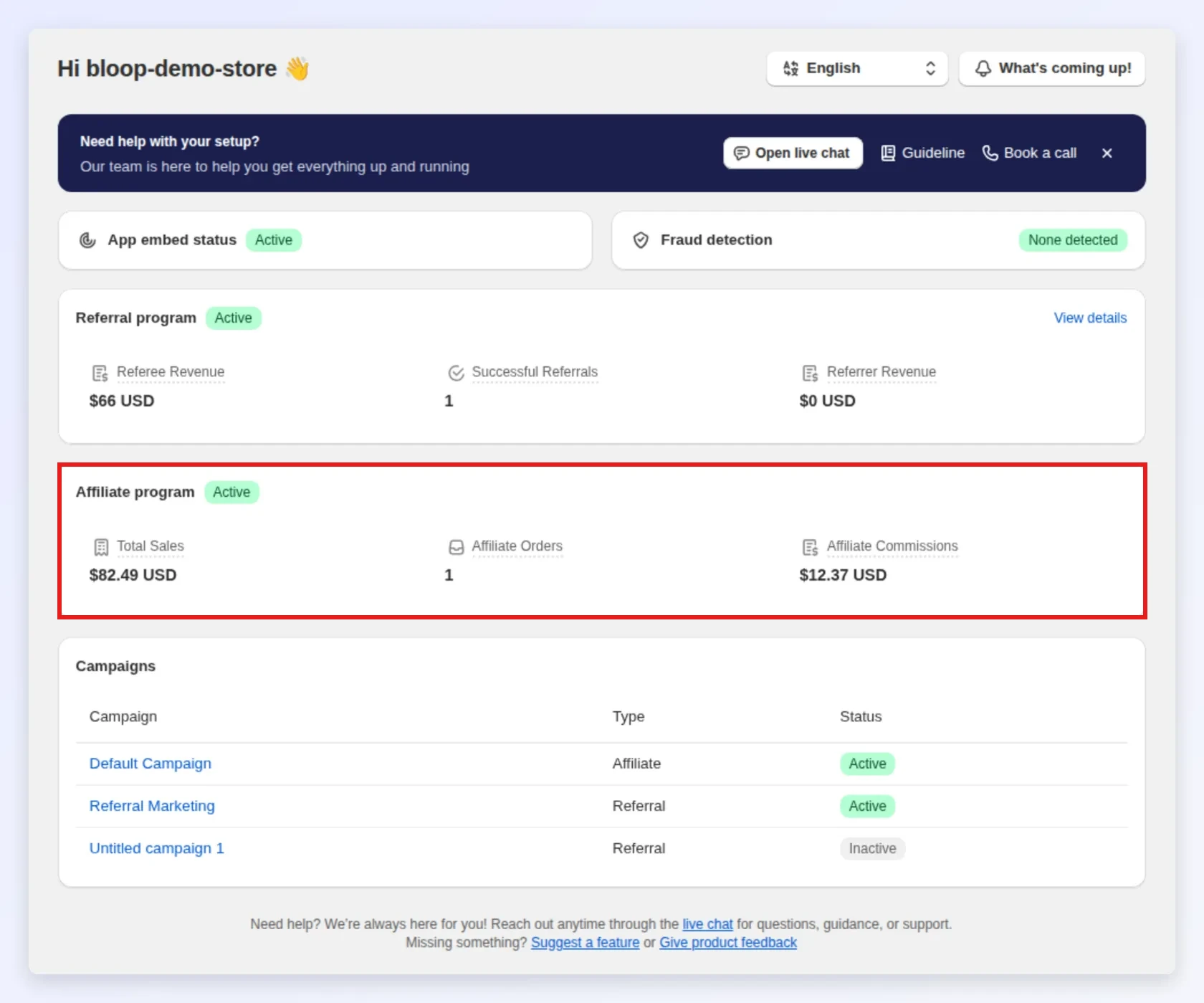
The red box marks the Affiliate program card, which shows total sales, affiliate orders and commissions in one place.
Where to go next
Section titled “Where to go next”- Set the commission behind steps 2 and 5 in Affiliate campaigns and commissions.
- Shape steps 1 and 7 with managing affiliates and affiliate payouts.
- See the customer equivalent in The referral journey.