

How to connect Mailchimp
Connect Mailchimp to use your referral data in the audience you already email. Bloop tags each contact as a referrer or referee, adds their referral link, code and results as merge fields, and sends an event at each step of a referral. You can then build segments and Customer Journeys without exporting a CSV.
What you’ll set up
Section titled “What you’ll set up”- A Mailchimp API key and the audience Bloop writes to
- Tags and merge fields on every referrer and referee in your program
- Customer Journey events to trigger automations
- A segment or journey that uses them
How it works
Section titled “How it works”Bloop writes three things to your Mailchimp audience:
- Tags describe who someone is: a referrer, a referee, or removed from the program.
- Merge fields hold a referrer’s details: link, code, revenue, successful referrals, join date and hub link.
- Events mark a moment, such as a referral converting. Start a Customer Journey from them.
Before you connect
Section titled “Before you connect”Bloop writes to one audience, and a sync changes every contact in it that is a referrer or referee. Read these two warnings before you choose the audience.
How to connect Mailchimp
Section titled “How to connect Mailchimp”-
Get your Mailchimp details
- In Mailchimp, create an API key under Profile → Extras → API keys, and copy it.
- Open the audience Bloop should write to, and copy its Audience ID from Settings → Audience name and defaults.
-
Connect Bloop to Mailchimp → Click Sync
-
In Bloop, go to Settings → Store-wide → Integrations, then click Integrate on Mailchimp.
-
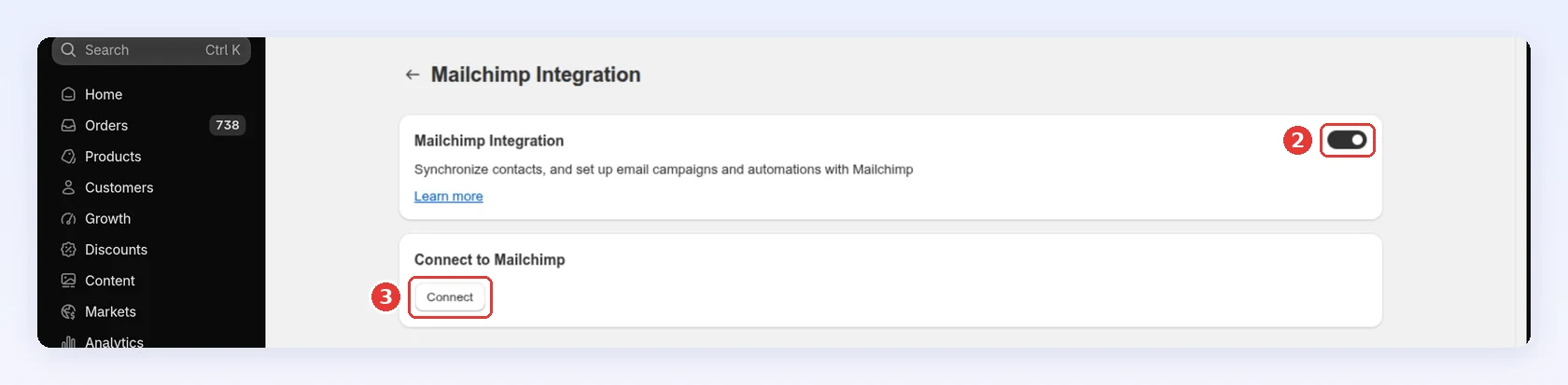
Turn on Mailchimp Integration. Connect stays disabled until it’s on.
-
Click Connect:
-
Paste your key into API key.
-
Paste your Audience ID into Audience id.
-
Click Sync:
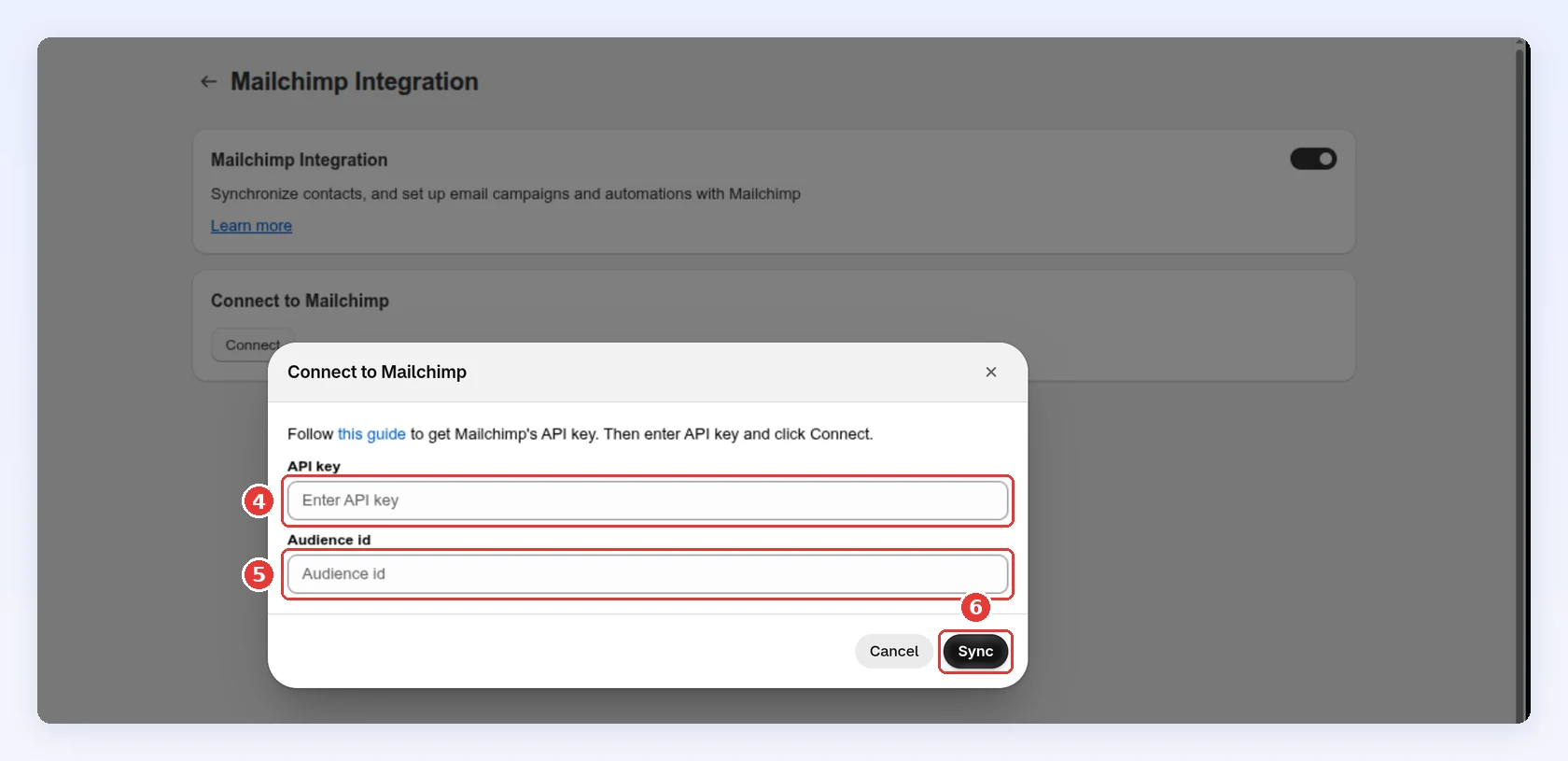
Sync checks the key and the audience, saves them, and sends every referrer and referee in your store to Mailchimp in one batch. There is no separate connect step. If the key or the Audience ID is wrong, Bloop marks the field as invalid and writes nothing to Mailchimp.
-
While the sync runs
Section titled “While the sync runs”The dialog shows the batch and its status, a progress bar, and the Total operations, Finished and Errored counts. When the batch finishes, View Mailchimp batch response opens Mailchimp’s result file, which lists the contacts that failed and why. The usual cause is a merge field that already exists in your audience with a different type. Each errored operation is a contact your segments miss, so fix the cause and sync again.
Closing the dialog only hides the progress. The batch keeps running in Mailchimp.
A contact who is both a referrer and a referee gets one entry with both tags.
Sync again, pause or disconnect
Section titled “Sync again, pause or disconnect”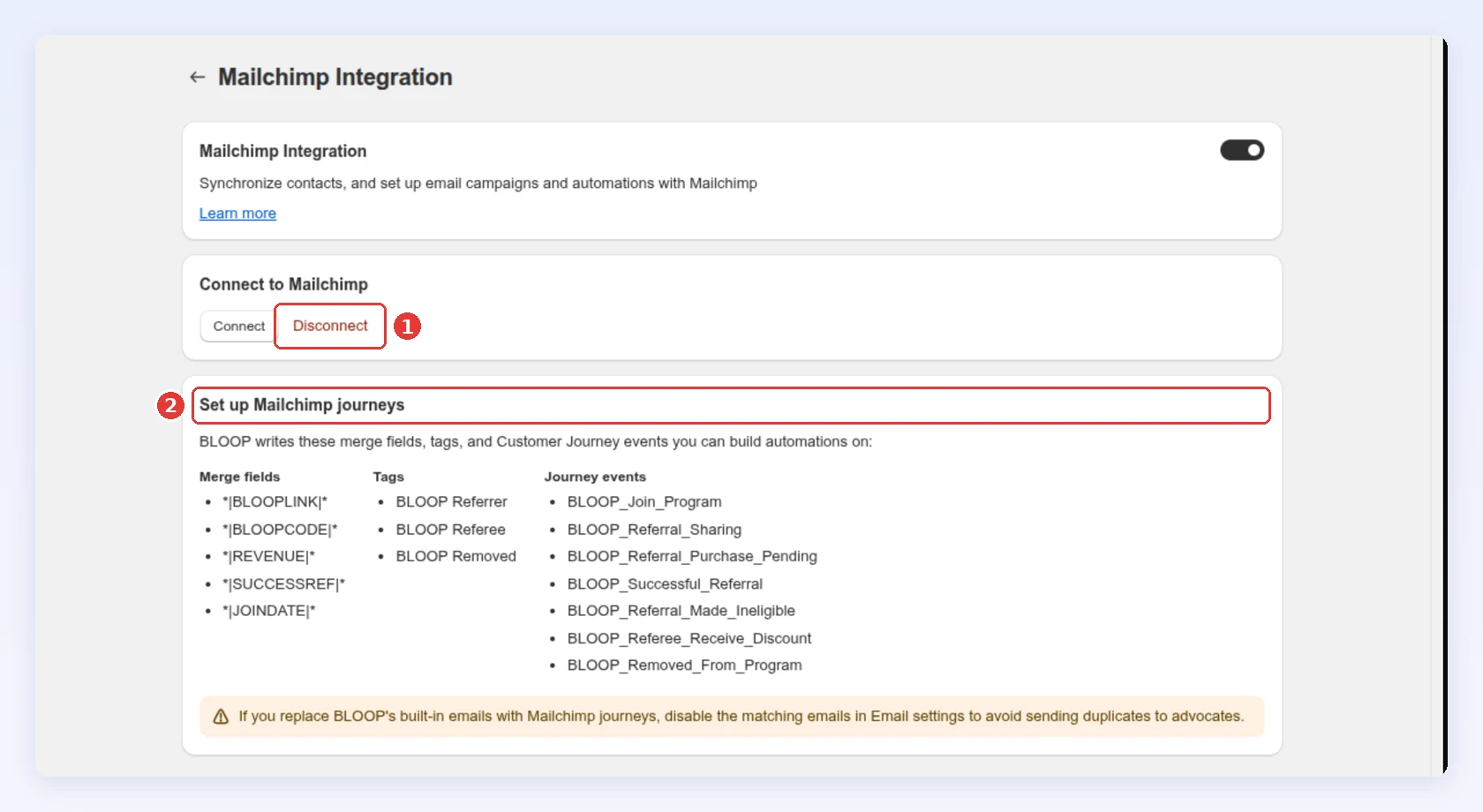
- Sync again: Bloop doesn’t re-sync on a schedule. To refresh every contact, click Connect (it stays next to Disconnect, with your saved key and Audience id already filled in), then click Sync. Both warnings above apply to each sync.
- Pause: Turning off Mailchimp Integration stops events and tag updates. Your key stays saved.
- Disconnect (1) stops all syncing, removes the saved key and Audience ID, and turns the switch off. Contacts, tags and fields already in Mailchimp stay there, and you can connect again at any time.
The Set up Mailchimp journeys card (2) lists the merge fields, tags and events Bloop writes. The tables below add what each one holds.
| Tag | Applied to |
|---|---|
BLOOP Referrer |
Every referrer |
BLOOP Referee |
Every referred friend, at sync and when they receive their discount |
BLOOP Removed |
A referrer removed from the program. Their BLOOP Referrer tag is turned off at the same time |
If you restore a removed referrer in the Fraud Center, Bloop turns BLOOP Referrer back on and BLOOP Removed off. A “current referrers” segment built on these tags stays accurate without manual cleanup.
Merge fields
Section titled “Merge fields”Bloop creates these fields in your audience the first time it needs them. They’re filled for referrers only. A referee’s contact carries the tag but no BLOOP merge fields.
| Merge tag | Field name in Mailchimp | Holds |
|---|---|---|
*|BLOOPLINK|* |
BLOOP Referral Link | Their referral link |
*|BLOOPCODE|* |
BLOOP Referral Code | Their referral code |
*|REVENUE|* |
BLOOP Referral Revenue | Referral revenue across all campaigns, as text in your store currency |
*|SUCCESSREF|* |
BLOOP Successful Referrals | Successful referrals across all campaigns, as a number |
*|JOINDATE|* |
BLOOP Joining Date | When they first joined your program |
*|BLOOPHUB|* |
BLOOP Hub Portal | A permanent link to their referral hub that signs them in, so it still works in an email sent weeks later |
REVENUE is text, so Mailchimp can’t segment on it with “greater than”. Segment on SUCCESSREF instead.
Merge fields refresh when a referrer joins, shares by email, earns a reward, or a friend receives a discount, and on every sync. Pending, declined and removal events don’t refresh them.
Customer Journey events
Section titled “Customer Journey events”Each event can start a Customer Journey.
| Event | Sent when |
|---|---|
BLOOP_Join_Program |
A customer joins your program for the first time. Joining a second campaign doesn’t send it again |
BLOOP_Referral_Sharing |
A referrer invites a friend with the share-by-email form. Social shares and copied links don’t send it |
BLOOP_Referral_Purchase_Pending |
A friend’s order is waiting on review or a reward delay |
BLOOP_Successful_Referral |
A referral converts and the referrer earns a reward |
BLOOP_Referral_Made_Ineligible |
A referral is rejected |
BLOOP_Referee_Receive_Discount |
A referred friend receives their discount |
BLOOP_Removed_From_Program |
A referrer is removed from the program |
Use these properties in a journey’s conditions and emails:
| Property | On event | Holds |
|---|---|---|
BLOOP_Referral_Link, BLOOP_Referral_Code |
Join, Sharing | The referrer’s link and code |
BLOOP_Purchase_Amount, BLOOP_Currency |
Purchase Pending | The friend’s order amount |
BLOOP_Reward |
Successful Referral | The reward code or amount |
BLOOP_Reward_Type |
Successful Referral | DISCOUNT, CREDIT, CASH, CUSTOM or FREE_PRODUCT |
BLOOP_Reason |
Made Ineligible | Why the referral was rejected |
BLOOP_Referee_discount_code |
Referee Receive Discount | The friend’s discount code |
Events go to the referrer’s contact, except BLOOP_Referee_Receive_Discount, which goes to the friend. A contact that isn’t in the audience yet is added as Subscribed, so the consent warning in Before you connect applies to events too. Leaving a single campaign sends no event.
Multiple campaigns
Section titled “Multiple campaigns”A merge field holds one value per contact, so BLOOPLINK and BLOOPCODE show the link and code of the campaign the referrer was most recently updated in, not one per campaign. REVENUE and SUCCESSREF add up every campaign.
If you run several campaigns and need each one’s link in your emails, use Klaviyo, which keeps a link and code per campaign.
Three high-value plays
Section titled “Three high-value plays”- A referrer-only newsletter. Segment on the
BLOOP Referrertag, so you never invite someone who already refers to join. - A VIP segment. Segment on the
BLOOP Referrertag andSUCCESSREFof 3 or more, and send them a campaign with*|BLOOPLINK|*. The segment updates as referrals land. - An instant thank-you. Start a journey from
BLOOP_Successful_Referraland branch onBLOOP_Reward_Type, so the wording matches the reward they got. This journey replaces Bloop’s Successful rewards email, so turn that email off.
Related
Section titled “Related”- Klaviyo integration - the same data in Klaviyo, with a link per campaign
- Referral email notifications - turn off a Bloop email that a journey replaces
- Referral hub - where
BLOOPHUBsigns referrers in