

How to customize the post-purchase popup
Right after checkout, a customer is happiest with you and the thank-you page has nothing else to click. Bloop’s Referral block sits there and gives every buyer their own referral link to share on the spot.
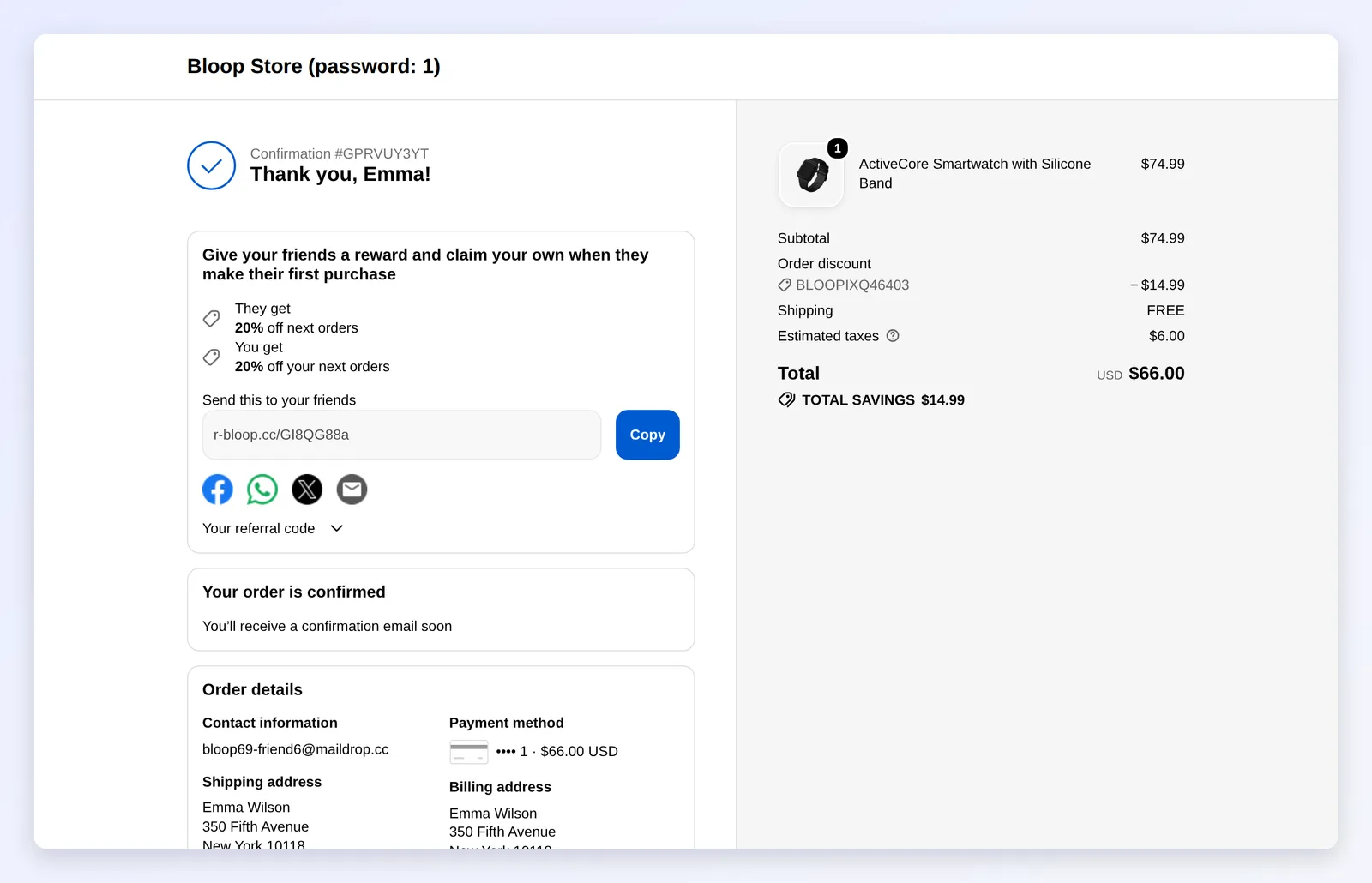
What you’ll set up
Section titled “What you’ll set up”- The text of the referral block and of the email invite, in each language you sell in.
- The block itself, placed on the Thank you page in Shopify’s checkout editor.
How it works
Section titled “How it works”- Buyers join automatically. When the thank-you page loads, Bloop adds the buyer to your active campaign using their order email, so the block shows their own link straight away. No login needed.
- It shows what your campaign allows: both rewards, the referral link with Copy, the share buttons, the referral code and Send email. The You get row appears only when the referrer reward is on. With more than one active campaign, the buyer picks one.
- It looks like your checkout. The block uses your Shopify checkout branding (fonts, colors, buttons), not your Bloop theme. Change its look in Shopify’s checkout editor.
- Free product rewards need no setup here. When a customer enters a free product code at checkout, Bloop adds the product to the order by itself. See free product rewards.
How to set up the post-purchase popup
Section titled “How to set up the post-purchase popup”-
Write the text → Click Save
-
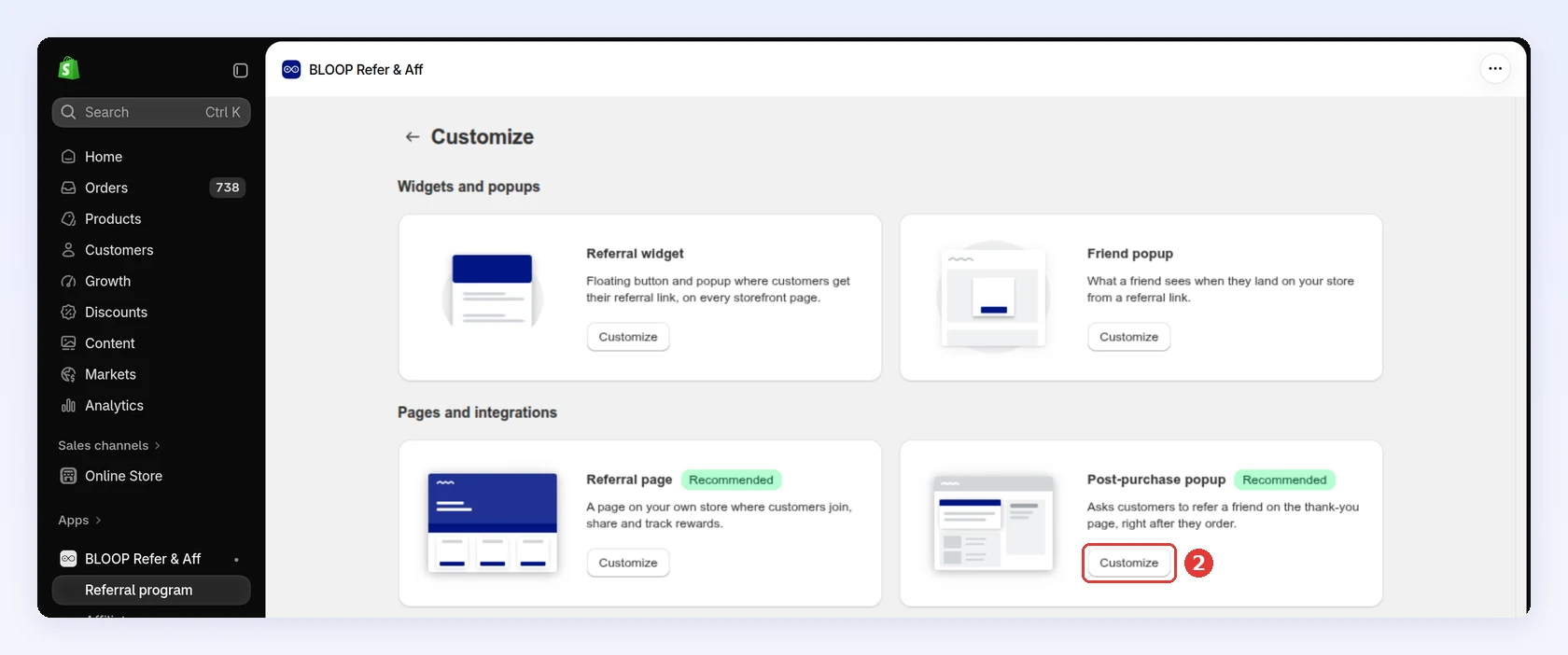
Open Referral program, open your campaign and go to Branding. Pick the theme you’re working on in the Theme selector at the top.
-
Under Pages and integrations, click Customize on Post-purchase popup:
-
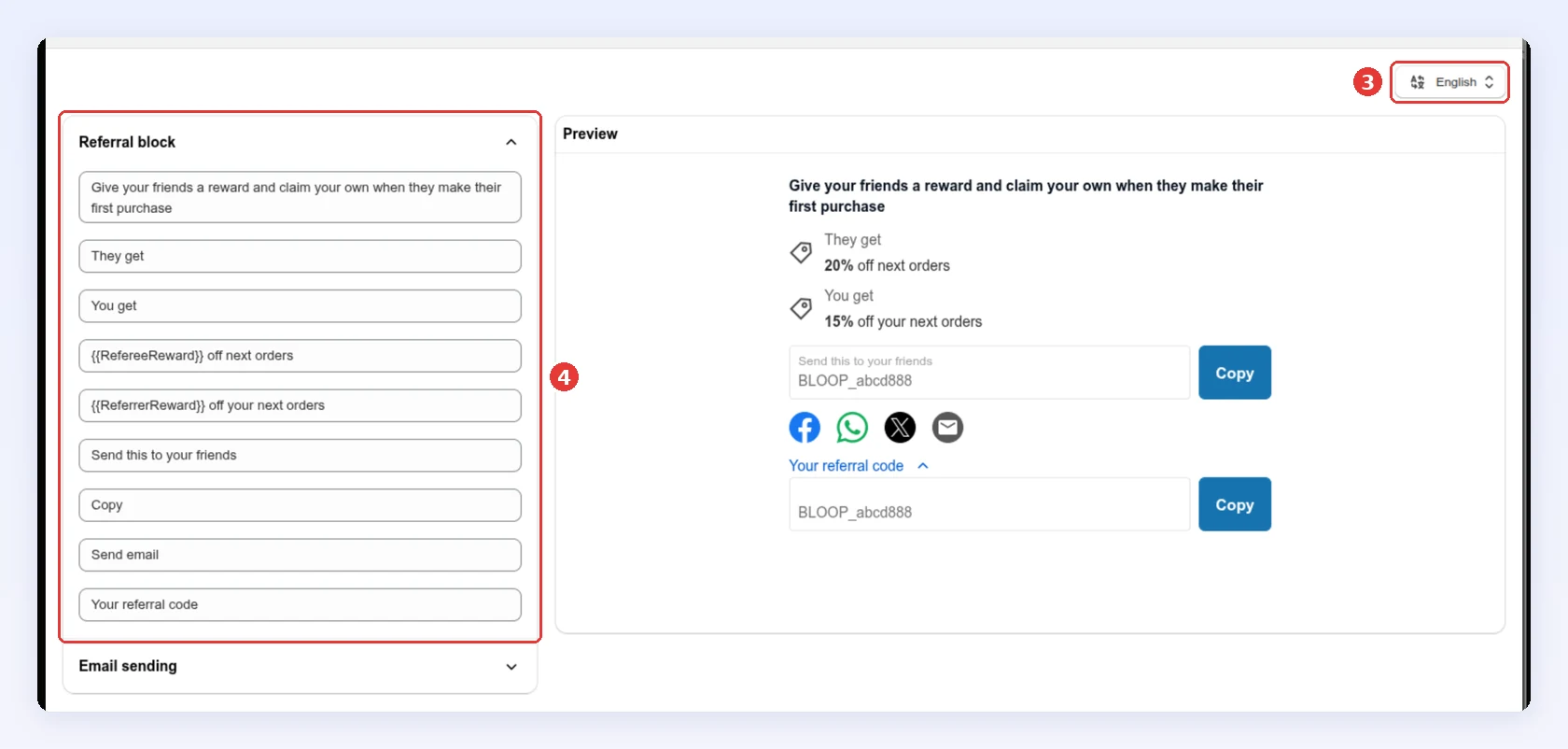
If automatic translation is on, pick a language in the selector first. Unsaved edits are lost when you switch. Each customer sees the text for their language, or Bloop’s built-in wording if you wrote none.
-
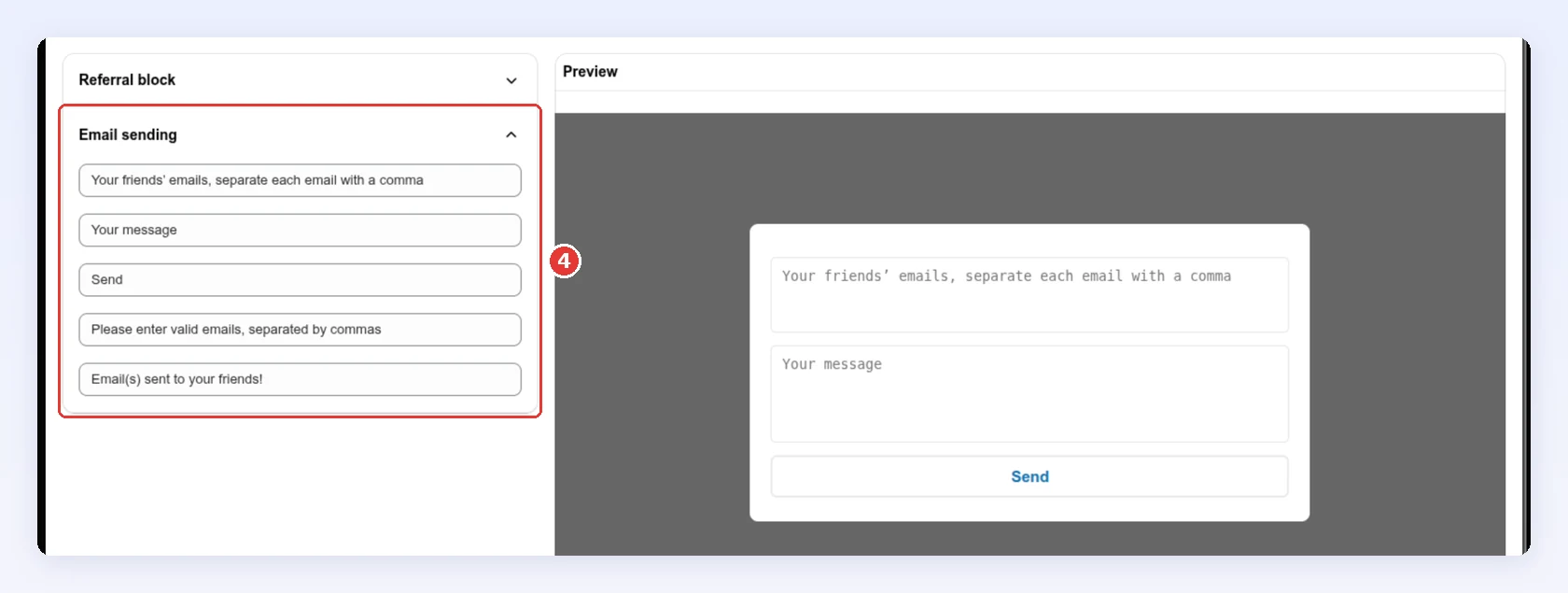
Edit the fields under Referral block, then under Email sending. Each field shows Bloop’s default text until you change it, and the preview updates as you type. See what each field changes:
-
Click Save.
-
-
Add the block to your thank-you page → Click Save
Nothing appears on the thank-you page until you place the block.
-
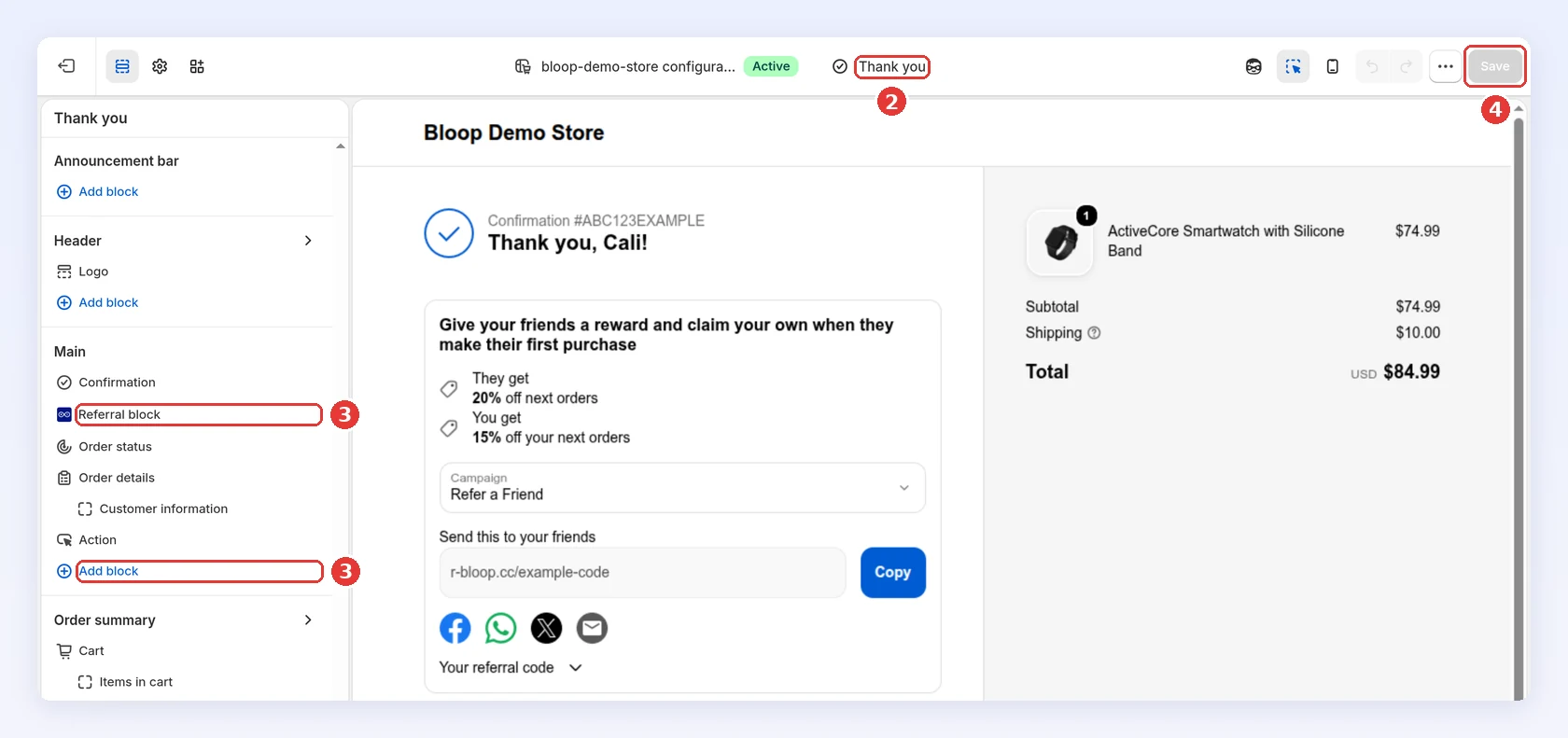
At the top right of the post-purchase editor, click Edit in checkout editor.
-
In Shopify’s checkout editor, make sure the page selector at the top shows Thank you.
-
Under Main, click Add block and choose Referral block.
-
Drag the block near the top, under the confirmation, where buyers see it first.
-
Click Save:
-
What each field changes
Section titled “What each field changes”| Field (default text) | Where it shows |
|---|---|
| Give your friends a reward and claim your own when they make their first purchase | The headline |
| They get / You get | Labels above each reward |
{{RefereeReward}} off next orders |
The friend’s reward. Keep the variable, Bloop fills in the value |
{{ReferrerReward}} off your next orders |
The buyer’s reward |
| Send this to your friends | Label above the referral link |
| Copy / Send email | The two buttons |
| Your referral code | The link that reveals the referral code |
| Your friends’ emails, separate each email with a comma | Email sending: hint in the box for friends’ addresses, in the form that opens from Send email |
| Your message / Send | Email sending: hint in the message box, and the send button |
| Please enter valid emails, separated by commas | Email sending: error when an address is wrong |
| Email(s) sent to your friends! | Email sending: confirmation after sending |
If the block doesn’t show
Section titled “If the block doesn’t show”- Not placed: open the checkout editor and check the Referral block is on the Thank you page and saved.
- Campaign inactive: turn the campaign on.
- Customer outside the audience: if your target audience uses Hide the referral program completely, logged-in customers who don’t qualify see nothing. That’s expected.
- Plan locked: the checkout editor preview says your plan doesn’t support the post-purchase widget. Every current plan includes it; some older plans don’t. Switch plan in Pricing plans, see switching plans.
Best practices
Section titled “Best practices”- Name the friend’s reward first, in one line. “Loved your order? Give a friend $10 off, and get $10 yourself” beats the default, which never says what the reward is.
- Keep it short. One headline and the share buttons. The customer is about to leave the page.
- Write every language you sell in. Buyers in other languages otherwise get Bloop’s built-in wording.
- Test your copy. Run an A/B test and keep the version with the higher share rate.
Related
Section titled “Related”- Widget panel, launcher and referee popup - the on-site widget
- Referral page - a permanent link to your program
- Customer account extension - reach repeat customers in their account
- Making your referral program visible - where each entry point fits