

How to detect referral fraud with the Fraud center
The most common abuse is self-referral: one person playing both referrer and friend. The Fraud center flags referrals that look like abuse and lists the referrers behind them, so you only review the few that matter.
What you’ll set up
Section titled “What you’ll set up”- The signals that flag a referral, and the checks that block a discount outright.
- A quick review of each flagged referrer: approve, reject, ban or exclude.
What happens when a referral is flagged
Section titled “What happens when a referral is flagged”Bloop holds the reward for 14 days, tags the Shopify order BLOOP suspicious referral, and lists the referrer in the Fraud center. If nobody acts, the reward is approved when the hold ends, unless the referrer is banned or the order was cancelled or refunded. See order status.
When the purchaser’s email is exactly the referrer’s own (ignoring capitals, +tag and dots in Gmail), Bloop rejects the referral straight away instead of holding it.
| Signal | Shown as | What it catches |
|---|---|---|
| Self-referral (email) | Self Referral | The same or a closely matching email, including the same name on another provider |
| Self-referral (matching last name) | Self Referral | Referrer and purchaser share a last name |
| Self-referral (matching address) | Self Referral | The order ships to the referrer’s default address |
| Same IP as referrer | Shared IP | 5 or more referred purchases from one IP in 30 days, by default |
| High referral volume | High volume | 7 or more referred purchases in 7 days, by default |
The self-referral signals are the strong ones. A shared IP or high volume can also be a household, an office, or a referrer who’s simply popular.
How to set your detection rules
Section titled “How to set your detection rules”-
Choose the signals → Click Save
-
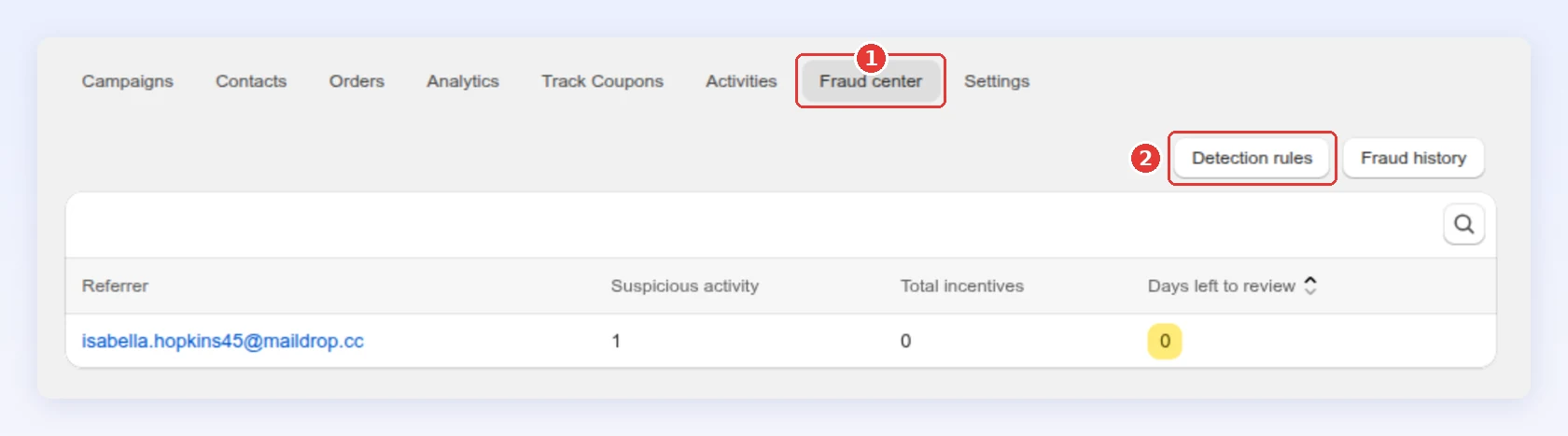
In Referral program, click the Fraud center tab.
-
Click Detection rules. It opens Settings → Referral → Fraud detection, which you can also open directly:
-
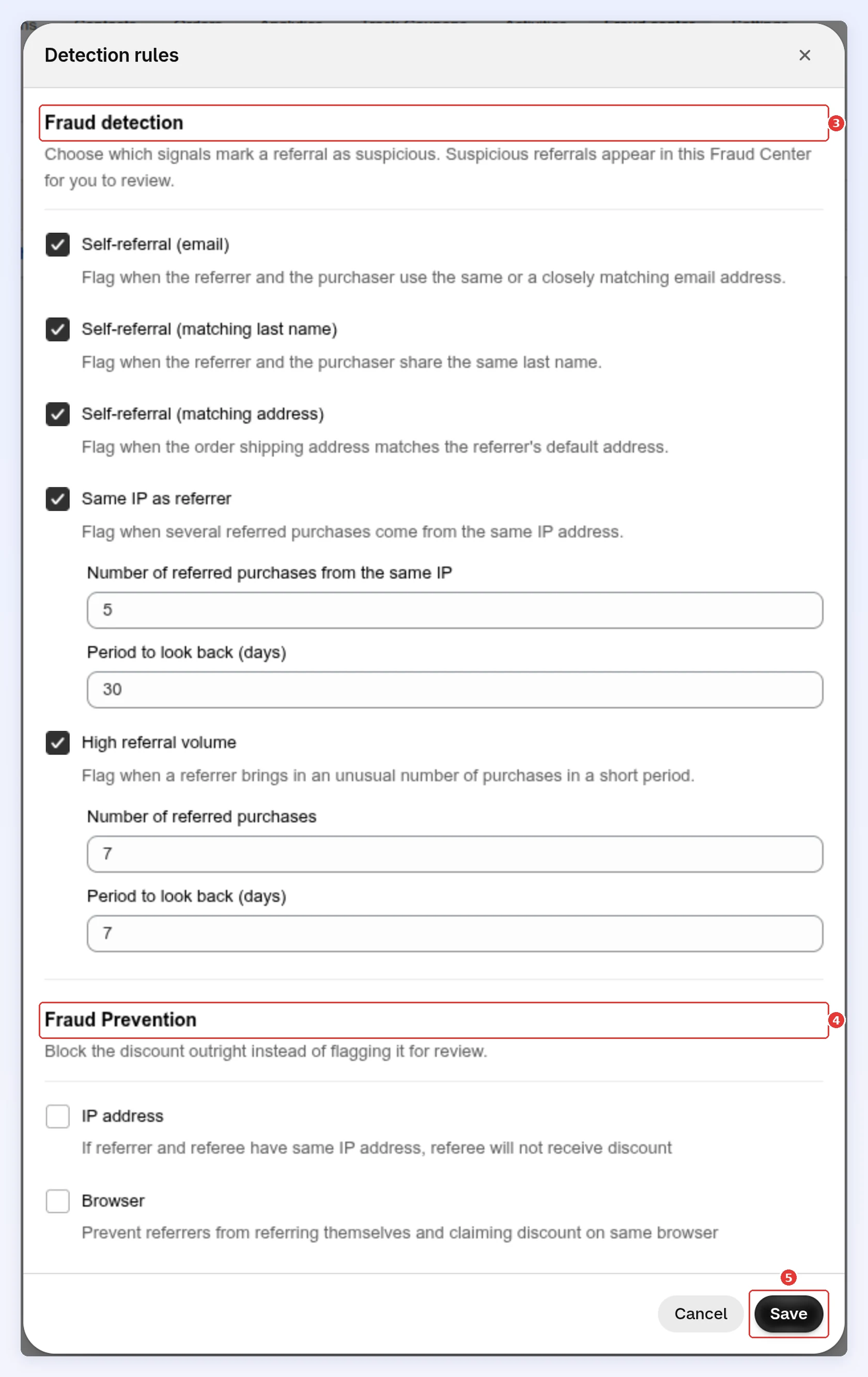
Under Fraud detection, tick the signals you want. For Same IP as referrer and High referral volume, set the number of purchases and the days to look back.
-
Under Fraud Prevention, tick IP address or Browser to block the discount outright (see below).
-
Click Save in the save bar:
-
Block abuse before it reaches the queue
Section titled “Block abuse before it reaches the queue”The two Fraud Prevention checks don’t flag a purchase for review. They stop the friend getting the discount at all. Both start off.
| Check | What it does |
|---|---|
| IP address | If the referrer and the friend share an IP address, the friend doesn’t get the discount |
| Browser | A referrer can’t follow their own link and claim the discount in the same browser |
While a check is on, Bloop also flags an order placed from the referrer’s own IP or browser. Turn on Browser freely, it rarely blocks a real referral. IP address also blocks genuine referrals between people on the same home or office network.
How to review a flagged referrer
Section titled “How to review a flagged referrer”-
Check the evidence → Approve, reject, ban or exclude
-
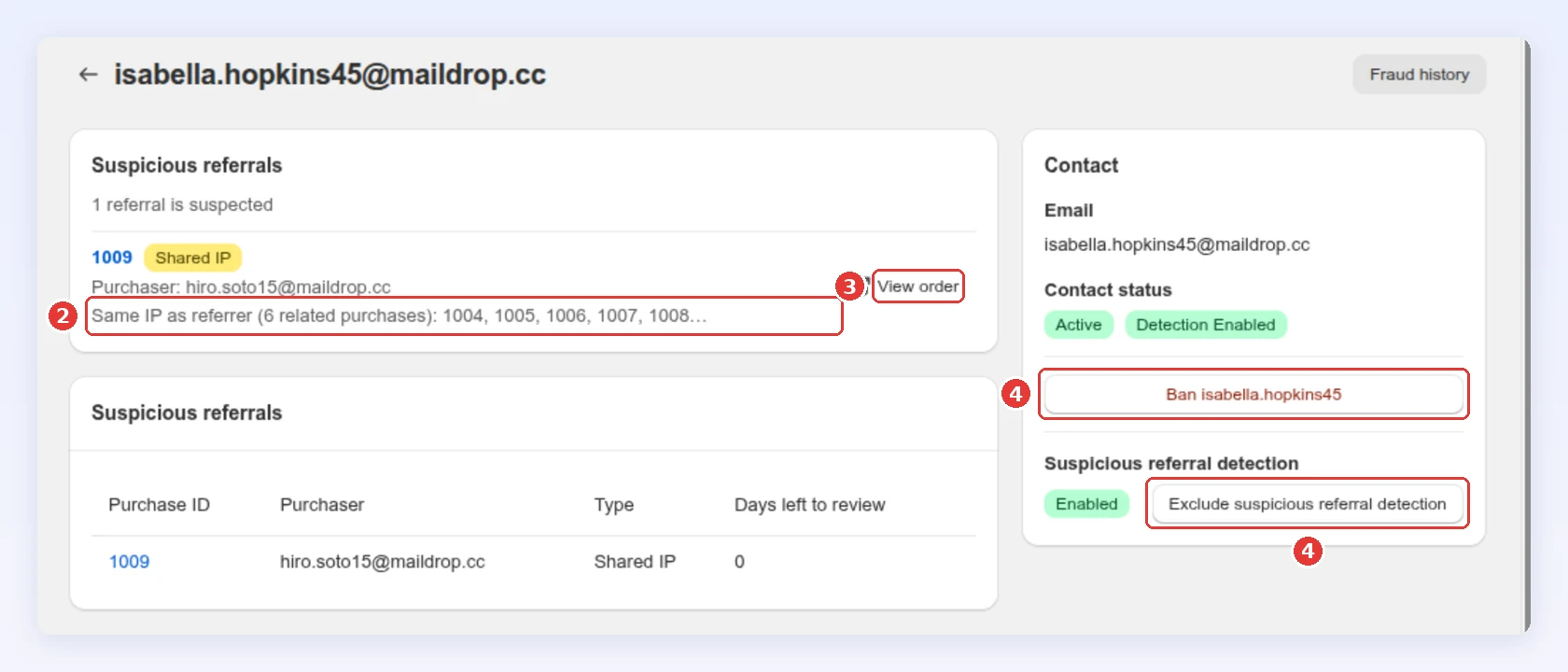
In the Fraud center, click a referrer. Start with the lowest Days left to review: at 0 the reward is about to be approved.
-
Read why each referral was flagged.
-
Click View order to open it in Orders, then approve or reject it. Either closes the case here.
-
For a clear abuser, ban them. For a genuine customer who keeps getting flagged, exclude them from detection:
-
How to decide
Section titled “How to decide”| Signal | What to do |
|---|---|
| Email or address match | Exact email, an alias on another domain, or the referrer’s address. Reject, and ban if it repeats |
| Last name only | Look closer. Family referrals are usually real |
| Shared IP only | With unrelated real emails, approve. It’s a household or an office |
| Shared IP + self-referral | Reject |
| High volume, varied | Varied IPs, emails and names: approve. This is a popular referrer |
| High volume, repeated | Repeated IPs or alias emails: reject and ban |
Ban a referrer
Section titled “Ban a referrer”Ban only a confirmed abuser. A ban disables their referral link and code and their unused reward codes, disqualifies their pending referred purchases, and stops new referrals counting.
A ban is not the same as Block contact in Contacts. Both stop the referrer’s link, code and pending rewards, but a block can be reversed with Unblock, and a ban can’t be undone in the app. Unblock doesn’t lift a ban made here.
-
Ban → Click Ban referrer from referring
-
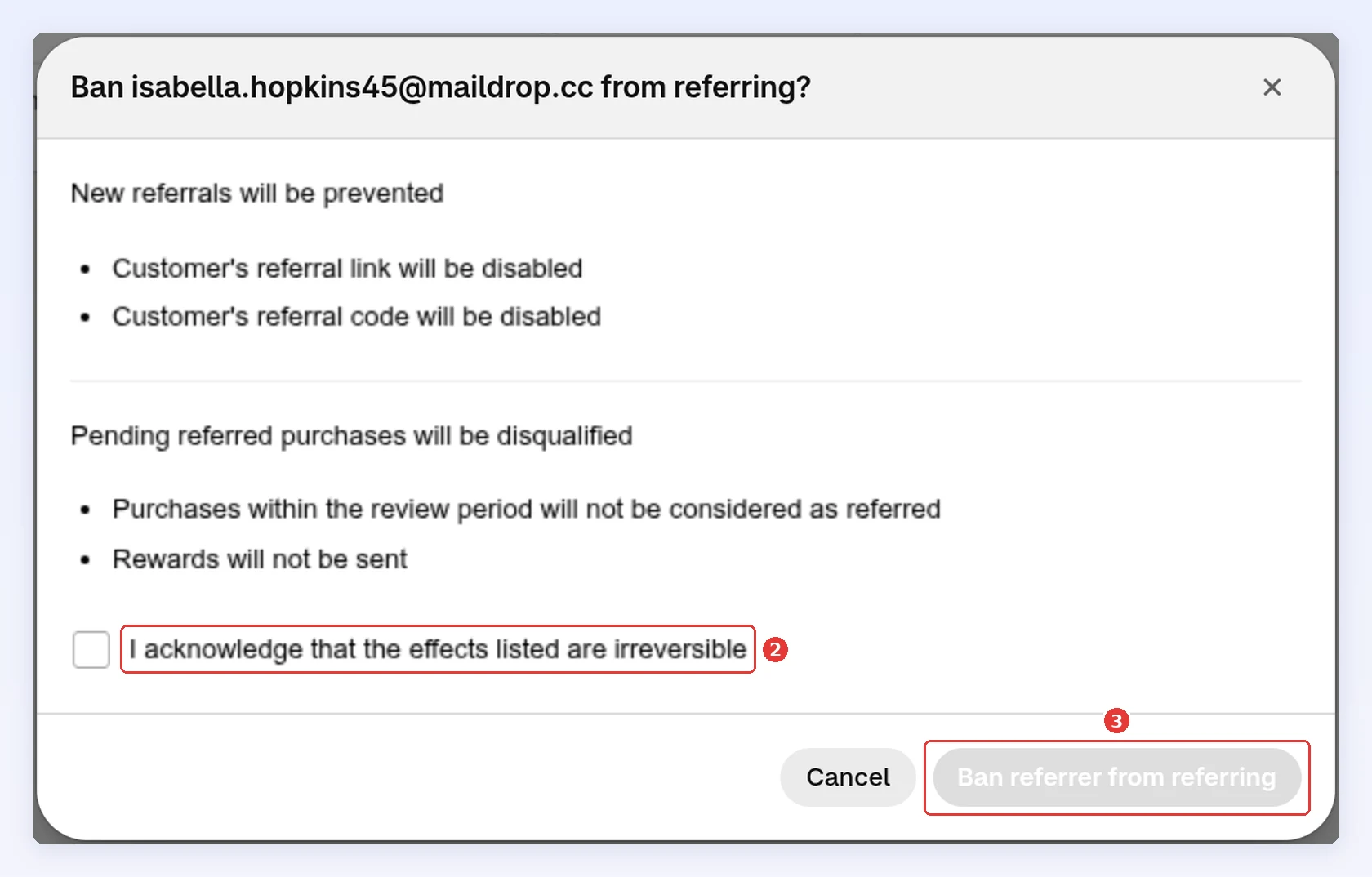
On the referrer’s page, click Ban followed by their name.
-
Tick I acknowledge that the effects listed are irreversible.
-
Click Ban referrer from referring:
-
Exclude a referrer from detection
Section titled “Exclude a referrer from detection”For a genuine customer who keeps getting flagged, for example a family ordering from one router, click Exclude suspicious referral detection on their page. Their future referrals stop being flagged; everyone else is unaffected. Enable detection turns it back on.
Fraud history
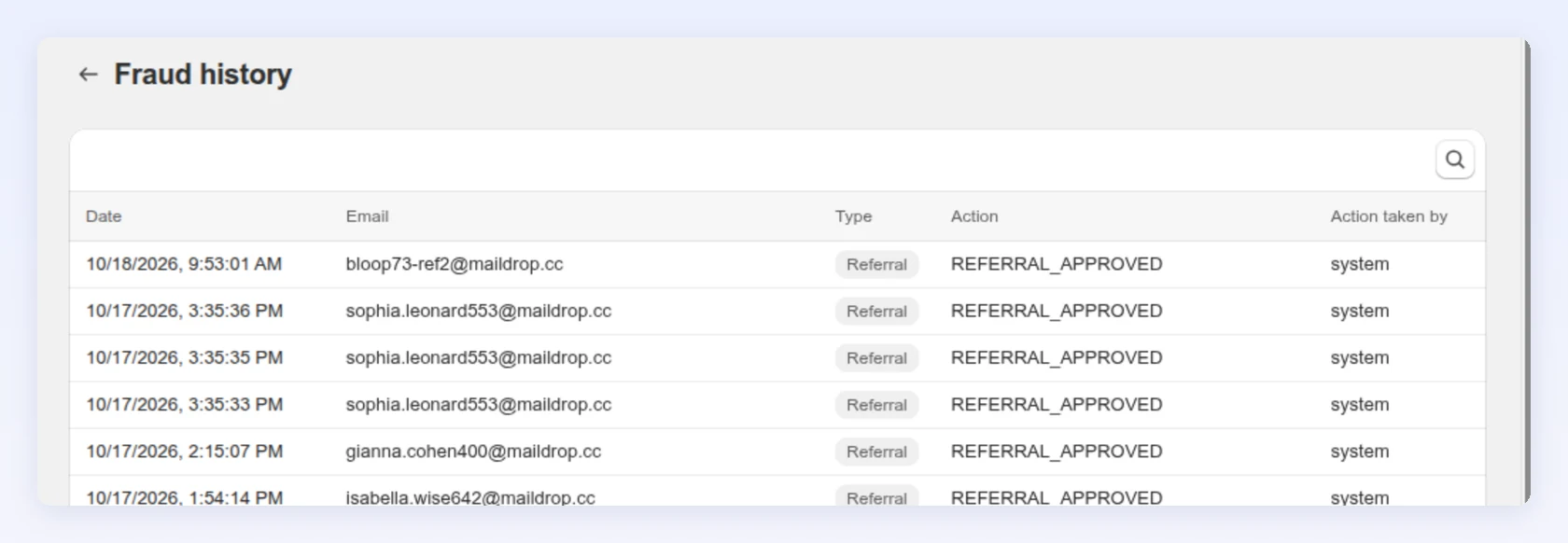
Section titled “Fraud history”Fraud history logs every action: the date, the referrer’s email, the action, and whether it was the system or someone on your team. Search it by email, or open it from a referrer’s page to see only theirs.
Best practices
Section titled “Best practices”- Review weekly. A flag nobody reads turns into an approved reward after 14 days.
- Don’t reject on one weak signal. A shared IP alone is usually a household.
- Exclude, don’t ban, a good customer. A ban can’t be undone from the app.
Related
Section titled “Related”- Referral orders - approve or reject flagged orders
- Contacts - block or remove a contact
- Preventing referral fraud without blocking real customers - the broader approach