

How to connect Klaviyo
Connect Klaviyo to send emails and flows to the right referrers, with their referral links and codes ready to use.
What you’ll set up
Section titled “What you’ll set up”- A Klaviyo connection, using a private API key
- A profile for each referrer, with their link and code
- A segment for each campaign, and events to trigger flows
How it works
Section titled “How it works”Bloop shares three things with Klaviyo:
- Profiles: each referrer’s details, campaigns, link and code.
- Segments: one per campaign. They update when someone joins or leaves.
- Events: a moment in the program, such as a referral converting. Use them to trigger flows.
How to connect Klaviyo
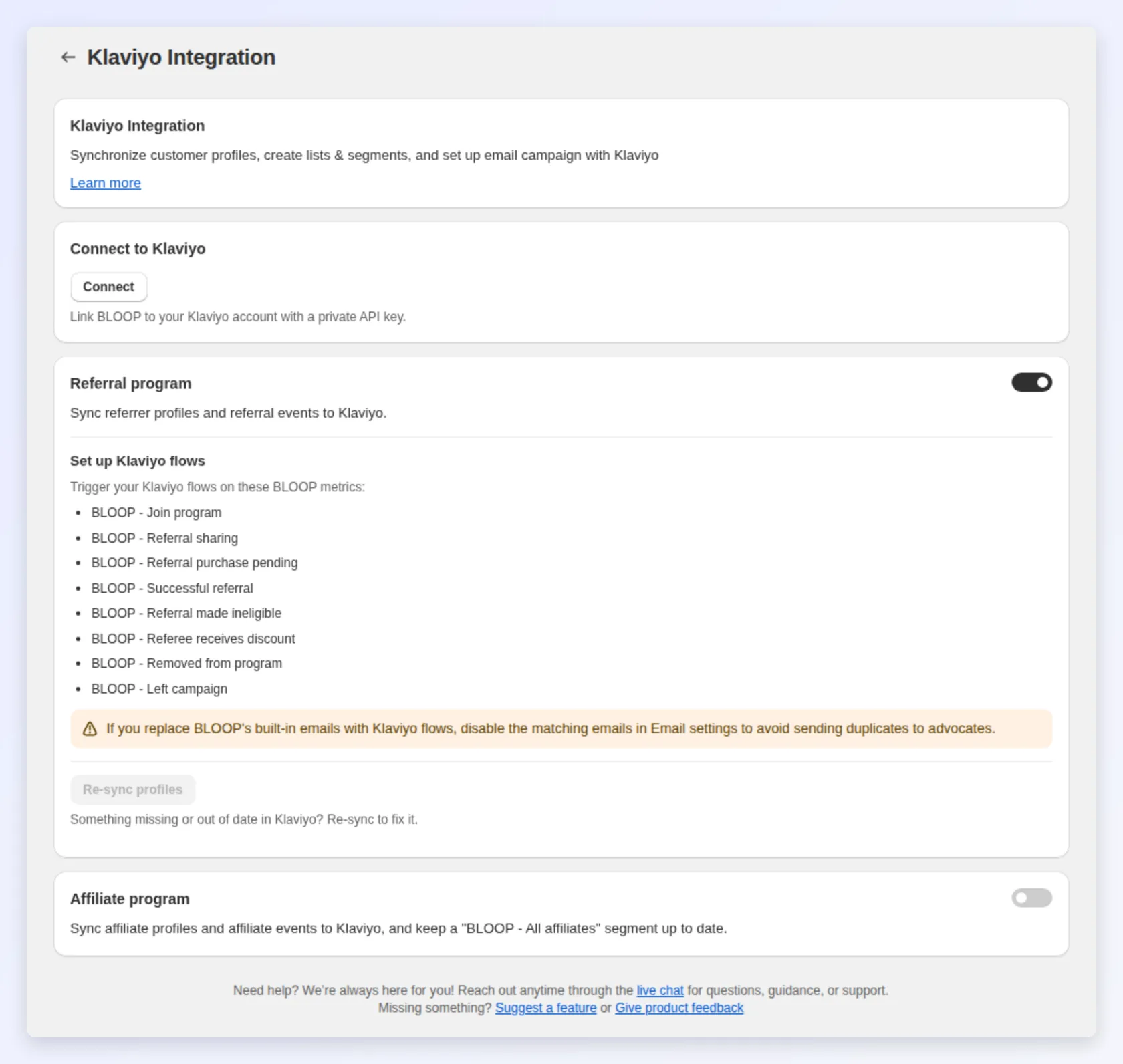
Section titled “How to connect Klaviyo”Open Settings → Store-wide → Integrations → Klaviyo. The page has one connection and two sections, Referral program and Affiliate program. Each section has its own switch and Re-sync profiles button.
-
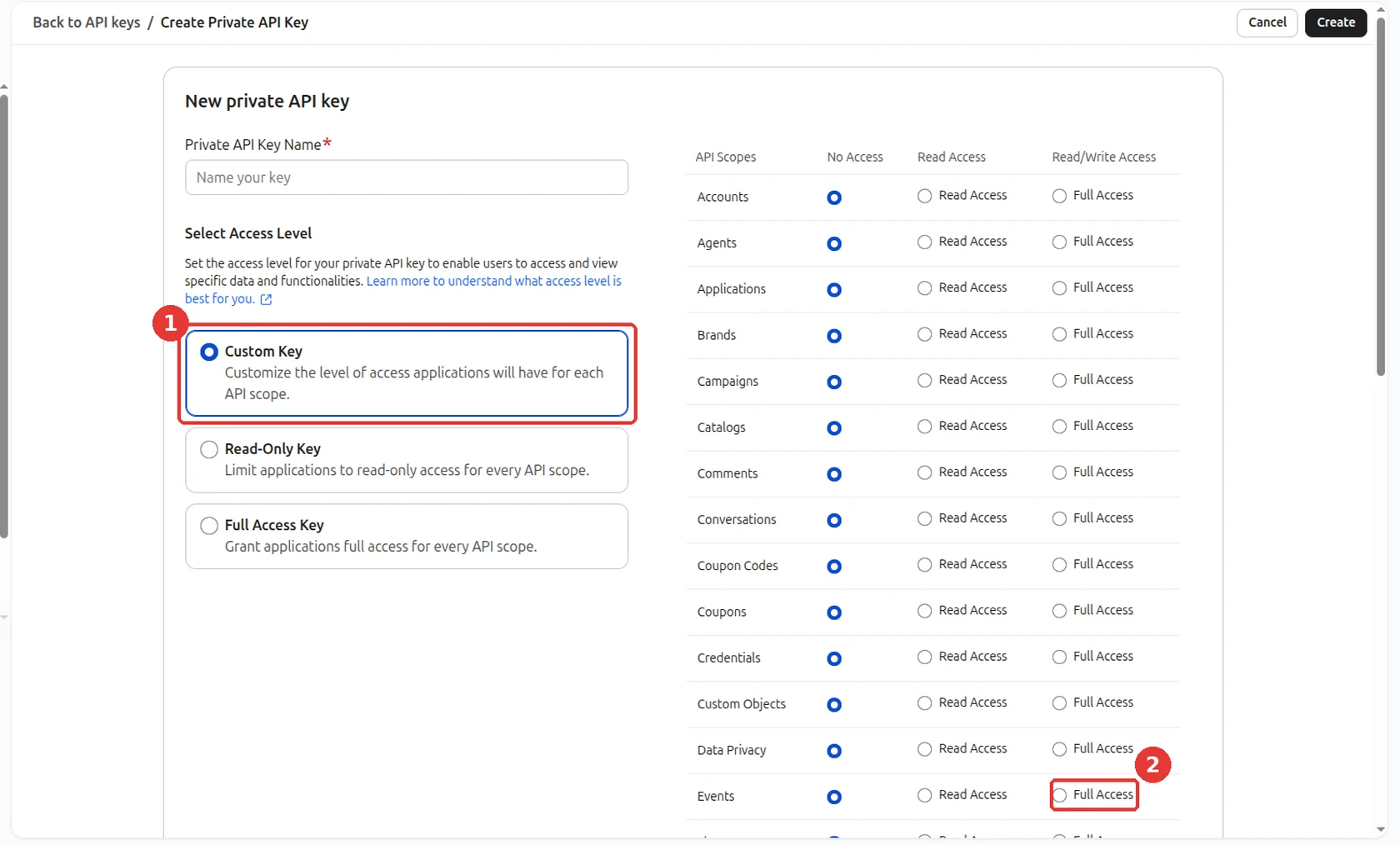
In Klaviyo, create a private API key. Select Custom Key, then give Full Access to List, Profiles, Events and Segments.
-
In Bloop, turn on Referral program, Affiliate program, or both. Connect stays disabled until one of them is on.
-
Press Connect, paste the key, and press Verify. If a permission is missing, Bloop names it.
-
Press Connect to save. Bloop starts a full profile sync straight away.
While the sync runs
Section titled “While the sync runs”The page shows progress as N of M profiles. The sync keeps running if you leave the page.
Pause, reconnect or disconnect
Section titled “Pause, reconnect or disconnect”- Turning a section off pauses its sync. Your key stays saved.
- Connected opens the same modal, so you can view or replace the key.
- Disconnect stops all syncing and removes the saved key. Profiles, segments and events already in Klaviyo stay there.
Keep Klaviyo up to date
Section titled “Keep Klaviyo up to date”Bloop updates a profile whenever that customer changes. Press Re-sync profiles to rebuild every profile, for example after a bulk audience change.
Only active campaigns sync. Referrers without an email address are skipped.
What’s on a referrer’s profile
Section titled “What’s on a referrer’s profile”| Property | What it holds |
|---|---|
BLOOP Campaigns |
The campaigns they belong to |
BLOOP Campaign Link {id} / BLOOP Campaign Code {id} |
Their referral link and code for each campaign. Insert them into emails |
BLOOP Hub Portal |
A permanent link to their referral hub. Safe in flows that send days later |
BLOOP Referral revenue / BLOOP Successful referrals |
Lifetime totals. They don’t drop when someone leaves a campaign |
BLOOP Is referrer / BLOOP Is referee |
Whether they are a referrer, or were referred |
BLOOP Joining date / BLOOP Joining source |
When and how they joined |
BLOOP Purchases needed for next reward / BLOOP Next reward description |
Progress to the next tier, when tiers are on |
To insert a campaign’s link, look up its property with the campaign’s id. For the campaign with id 123:
{{ person|lookup:'BLOOP Campaign Link 123' }}Use BLOOP Campaign Code 123 for the code. To find a campaign’s id, open the campaign in Bloop: the id is the number after campaignId= in the page address. You can also open the Klaviyo profile of someone in that campaign and read their BLOOP Campaign Link {id} properties, or check the BLOOP - Campaign id field on any event Bloop sends.
Segments for each campaign
Section titled “Segments for each campaign”Once a campaign leaves draft, Klaviyo has a segment named BLOOP - {campaign name}. Its membership updates by itself. Use it as the recipient list for a broadcast, or with Klaviyo’s Added to segment trigger in a flow. Renaming the campaign renames the segment.
Events Bloop sends
Section titled “Events Bloop sends”Each event appears in Klaviyo as a metric you can use as a flow trigger. Every event carries the campaign name and id, so a flow can target one campaign.
| Bloop metric | Fires when | Flow ideas |
|---|---|---|
BLOOP - Join program |
A customer joins your program | Welcome email with their referral link |
BLOOP - Referral sharing |
A referrer shares their link by email | Thank them, and restate the reward |
BLOOP - Referral purchase pending |
A friend purchased, and the reward is under review | “Your reward is on its way” |
BLOOP - Successful referral |
A referral converts. Carries the reward type and code | Congratulations, with the reward code |
BLOOP - Referral made ineligible |
A referral is rejected | A tactful heads-up with the reason |
BLOOP - Referee receives discount |
The referred friend gets their discount | Remind them before the code expires |
BLOOP - Left campaign |
A customer leaves one campaign | Stop share reminders, or send a win-back email |
BLOOP - Removed from program |
A customer is removed from the program | Exclude them from all related automations |
When a customer leaves a campaign
Section titled “When a customer leaves a campaign”Say your campaign targets VIP-tier customers only, and Anna drops out of that tier:
- Anna no longer qualifies for the VIP Program campaign.
- Her referral link and code for that campaign stop working.
- She leaves the
BLOOP - VIP Programsegment, and VIP Program disappears from her campaign list. - The
BLOOP - Left campaignevent fires, so your flows can stop share reminders or send a win-back email.
Three things to know:
- The Left campaign event carries no link or code, so your flows can’t send a dead link by mistake.
- Revenue and referrals Anna brought in stay in her totals.
- If you move many customers at once, profiles and segments still update, but no events fire. Your flows never mass-email by accident.
Sync your affiliates
Section titled “Sync your affiliates”Turn on the Affiliate program section to send your affiliates to Klaviyo on the same connection. Its Re-sync profiles pushes every affiliate and refreshes their segments.
Affiliate properties start with BLOOP Affiliate, so they never clash with the referral properties:
| What it covers | Properties |
|---|---|
| Status and dates | BLOOP Is affiliate, BLOOP Affiliate status, BLOOP Affiliate joined date |
| Coupon and links | BLOOP Affiliate coupon, BLOOP Affiliate link, BLOOP Affiliate portal |
| Campaign | BLOOP Affiliate Campaigns |
| Sales | BLOOP Affiliate total sales, BLOOP Affiliate commission, BLOOP Affiliate sale count |
Bloop keeps two kinds of segment up to date: BLOOP - All affiliates, and one BLOOP Affiliate - {campaign name} segment for each affiliate campaign.
| Bloop metric | Fires when |
|---|---|
BLOOP - Affiliate joined program |
Someone signs up through your registration form |
BLOOP - Affiliate added manually |
You add an affiliate yourself |
BLOOP - Affiliate approved / BLOOP - Affiliate rejected |
You approve or reject an application |
BLOOP - Affiliate new coupon |
An affiliate gets a new coupon |
BLOOP - Affiliate new sale |
A sale is recorded for an affiliate |
BLOOP - Affiliate sale approved / BLOOP - Affiliate sale declined |
You approve or decline a sale |
BLOOP - Affiliate payout paid |
You mark a payout as paid |
The same rule applies as for referrals. If a Klaviyo flow replaces one of Bloop’s affiliate emails, turn that email off in Bloop.
Upgrade an older connection
Section titled “Upgrade an older connection”Only needed if the Klaviyo page shows the Upgrade available badge next to Re-sync profiles. New connections already use the current format. Older connections use one of two earlier formats, and you can tell them apart on a referrer’s Klaviyo profile:
-
Legacy: one
BLOOP Referral linkand oneBLOOP Referral codeon the profile. -
Campaign-based: the
BLOOP Campaign LinksandBLOOP Campaign Codesdictionaries, keyed by campaign name. -
You’ll see the prompt when you press Re-sync profiles, or, on the legacy format, when you create a second campaign.
-
Upgrading is one-way. Press Upgrade & sync to continue, or cancel to change nothing.
-
On the campaign-based format, you can choose Sync without upgrading. It re-syncs your profiles, keeps your current properties and leaves the upgrade for later.
| Old property | Use instead |
|---|---|
BLOOP Referral link |
BLOOP Campaign Link {id}. The old property now points to the referrer’s hub |
BLOOP Referral code |
BLOOP Campaign Code {id} |
BLOOP Campaign Links / BLOOP Campaign Codes |
BLOOP Campaign Link {id} / BLOOP Campaign Code {id} |
After the upgrade, BLOOP Campaigns drives your campaign segments.
Three high-value plays
Section titled “Three high-value plays”- Top-referrer VIP segment. Build it on
BLOOP Successful referralsat your threshold, and give those referrers richer rewards or early access. - Reward thank-you flow. Trigger it from the
BLOOP - Successful referralevent, so the thank-you lands the moment a referral converts. - Win-back leavers. Trigger it from
BLOOP - Left campaignto invite the customer into another campaign. Their lifetime stats go with them.
Related
Section titled “Related”- Mailchimp integration: the equivalent integration for Mailchimp.
- Referral analytics: the in-app view of the same performance.