

How to review and manage referral orders
Most referral orders need nothing from you: Bloop records the purchase, waits out the review period and issues the reward. The Orders tab is for the few that need a decision, the referrals Bloop missed, and the cash rewards you pay by hand.
What you’ll do here
Section titled “What you’ll do here”- Approve or reject an order that’s on hold.
- Add a referral order Bloop didn’t catch, such as a phone order.
- Pay out cash rewards and mark them as paid.
Understanding order status
Section titled “Understanding order status”| Status | What it means | If you do nothing |
|---|---|---|
| Pending - N hours left of review period | The review period is running. Set it in Settings → Referral → Rewards and orders: 6 hours by default, 0 approves instantly |
Approves itself |
| Pending, Suspicious | Bloop’s fraud checks flagged it and put it on a 14-day hold. See the fraud center | Approves itself after 14 days |
| Pending, no countdown | The reward is a custom reward | Waits for you |
| Payout pending | An approved cash reward waiting for you to pay | Waits for you |
| Reward sent | Approved, and the reward was issued | |
| Reward declined | Rejected by you, or automatically |
An order is rejected instead of approved if it’s cancelled or refunded during the hold, or if you ban the referrer. If the campaign was turned off, or the order was deleted in Shopify, the order stays Pending when the hold ends and Bloop doesn’t decide it for you: open it and approve or reject it yourself. A reward already sent can still be revoked if the order is later cancelled or refunded.
How to approve or reject an order
Section titled “How to approve or reject an order”-
Open the order
-
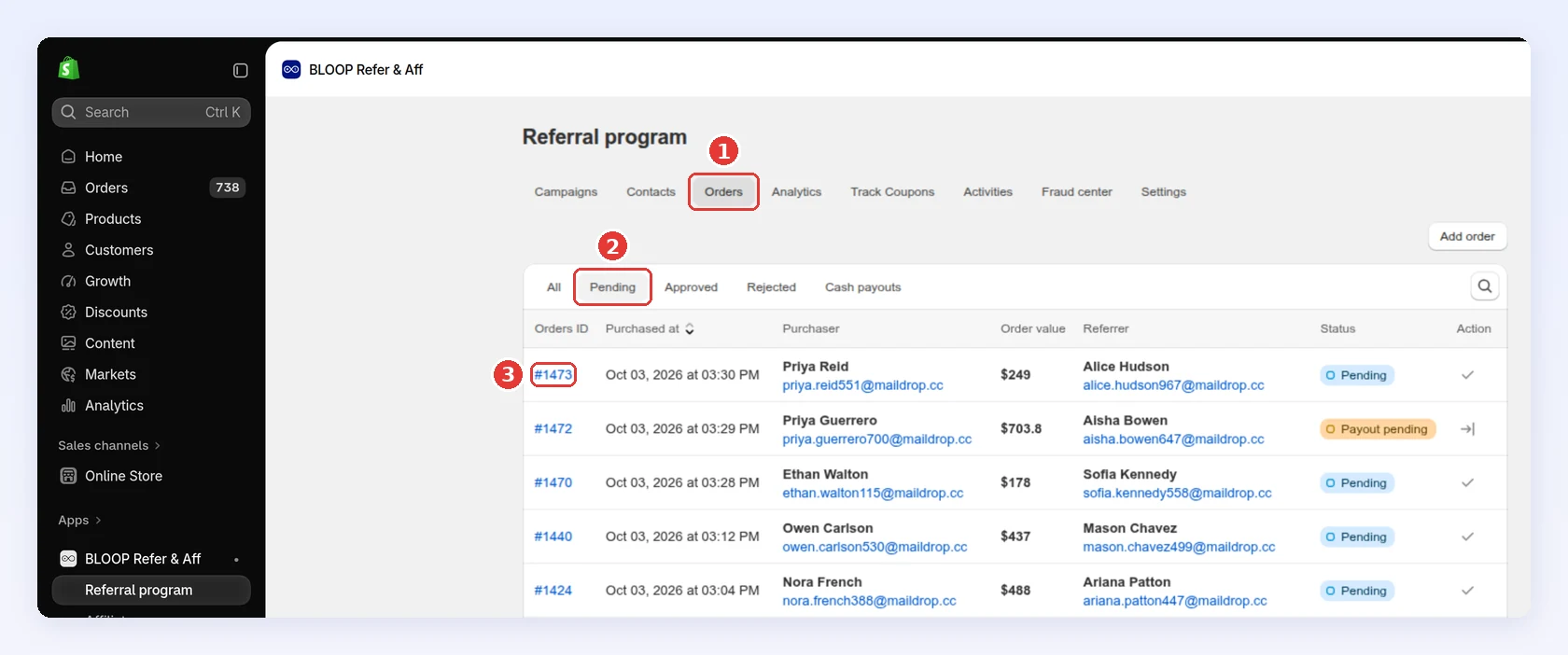
In Referral program, click the Orders tab.
-
Click Pending.
-
Click the order ID:
-
-
Check it → Click Approve or Reject
-
Check the referrer and the purchaser. Click View in Shopify to see the order itself.
-
Click Approve or Reject, then confirm:
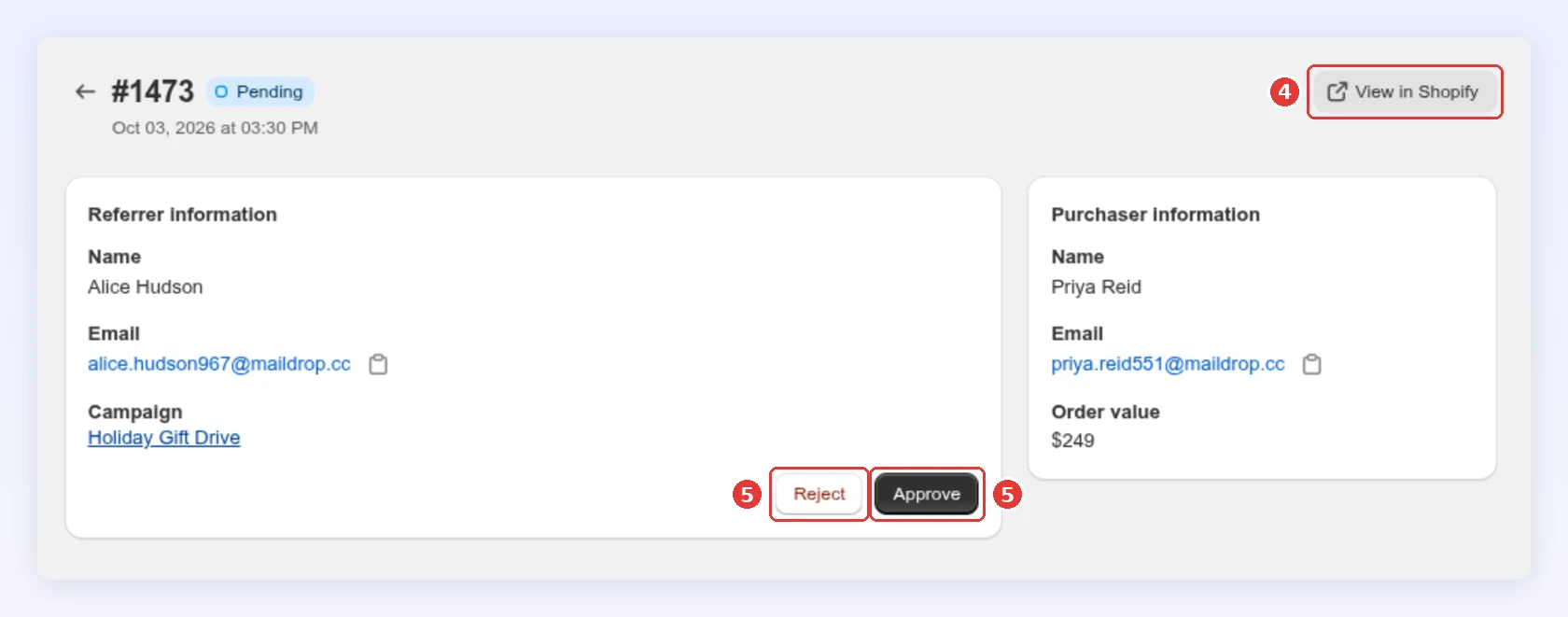
Approving or rejecting a flagged order also closes its case in the fraud center.
-
How to add a referral order manually
Section titled “How to add a referral order manually”Use this when a referral never reached Bloop, for example a phone order or a code the customer mentioned but didn’t enter.
-
Add the order → Click Add
-
On the Orders tab, click Add order.
-
In Order, enter the Shopify order number (
#1001) or ID. Bloop shows the order value and purchaser so you can check it. -
In Referrer, search for the referrer to credit.
-
In Campaign, pick an active campaign.
-
Leave Send reward to referrer ticked, or untick it if you already rewarded them another way.
-
Click Add:
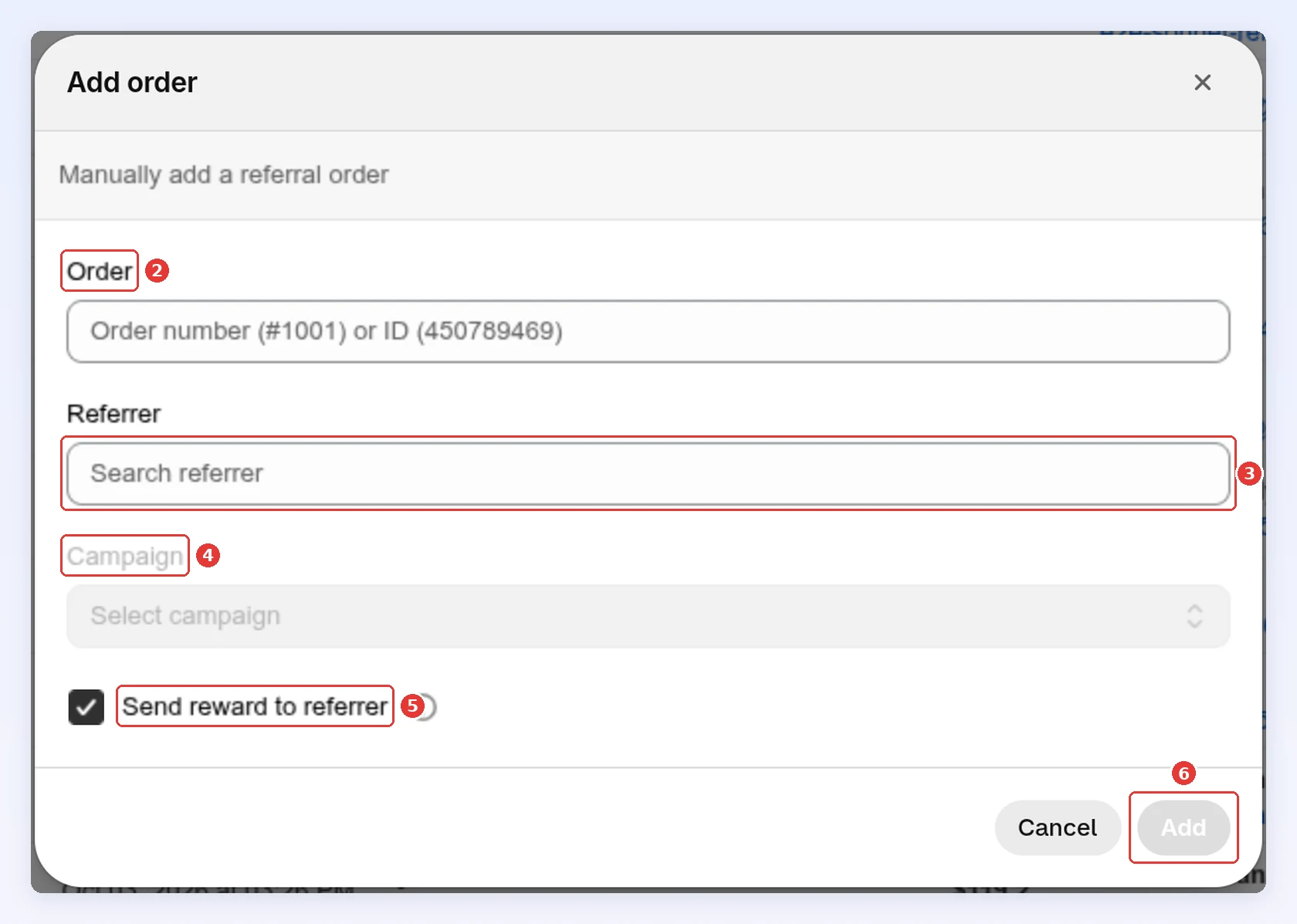
Bloop refuses an order that’s already assigned to a referrer, a purchaser already tied to another referrer, and a referrer who isn’t in the campaign you picked. An order or purchaser stays with the referrer it was first credited to, so you can’t move it with Add order. If the referrer isn’t in the campaign, open them in Contacts to see which campaign they joined, and pick that one.
-
Pay out cash rewards
Section titled “Pay out cash rewards”Cash rewards are tracked in Bloop and paid by you, outside the app.
-
Pay the referrer → Click Mark as Paid
-
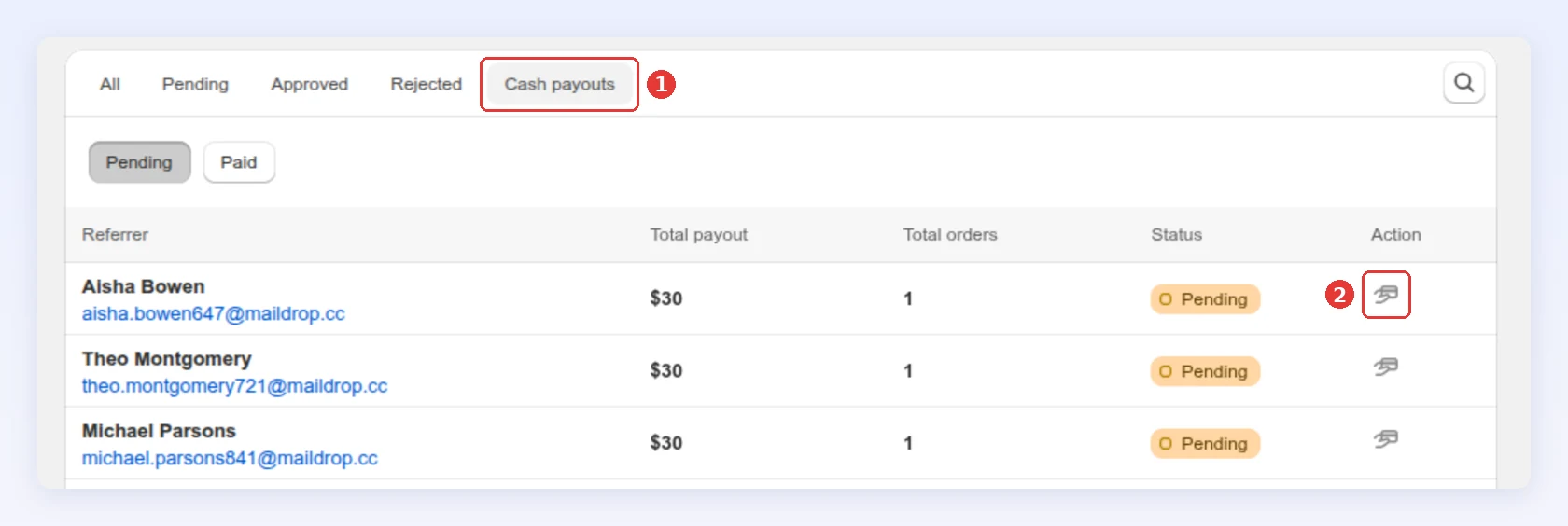
On the Orders tab, click Cash payouts.
-
In the Pending view, click the payout icon next to the referrer:
-
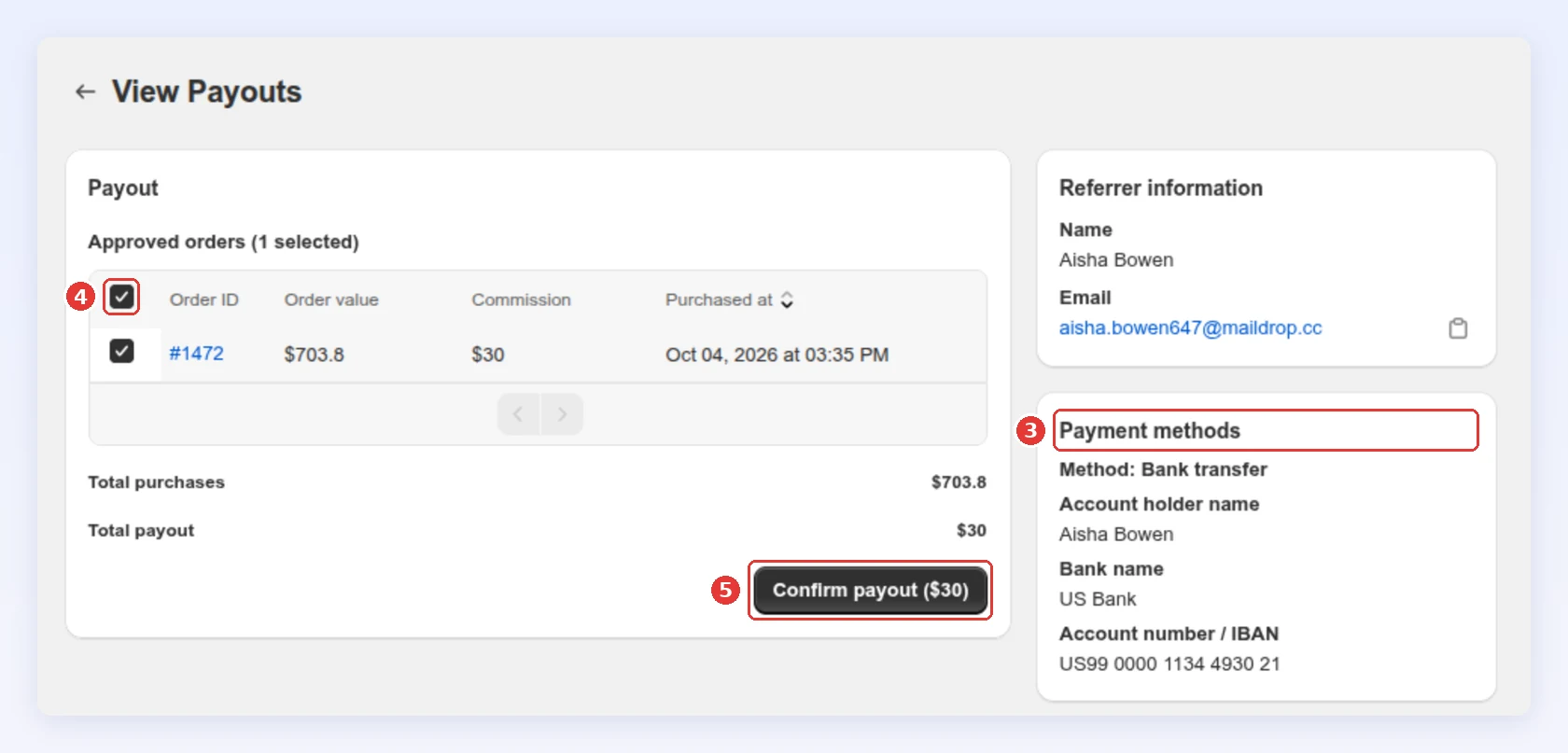
Check how they want to be paid under Payment methods.
-
Tick the approved orders you’re paying for.
-
Pay the referrer outside Bloop, then click Confirm payout:
-
Tick I confirm I have already paid … outside this app and click Mark as Paid.
-
Best practices
Section titled “Best practices”- Check the Pending tab weekly. Flagged orders approve themselves after 14 days, and custom rewards wait until you act.
- When in doubt, approve. A rejected genuine referrer usually stops sharing. One bad reward costs less than that.
- Keep the review period short. The 6-hour default suits most stores. Go longer if your return rate is high or your orders are large.
Related
Section titled “Related”- Fraud center - investigate flagged orders
- Referrer and referee rewards - how rewards are set up
- Reward timing and revocation - when rewards are issued and taken back
- Contacts - see each referrer and their rewards