How to set your referral target audience
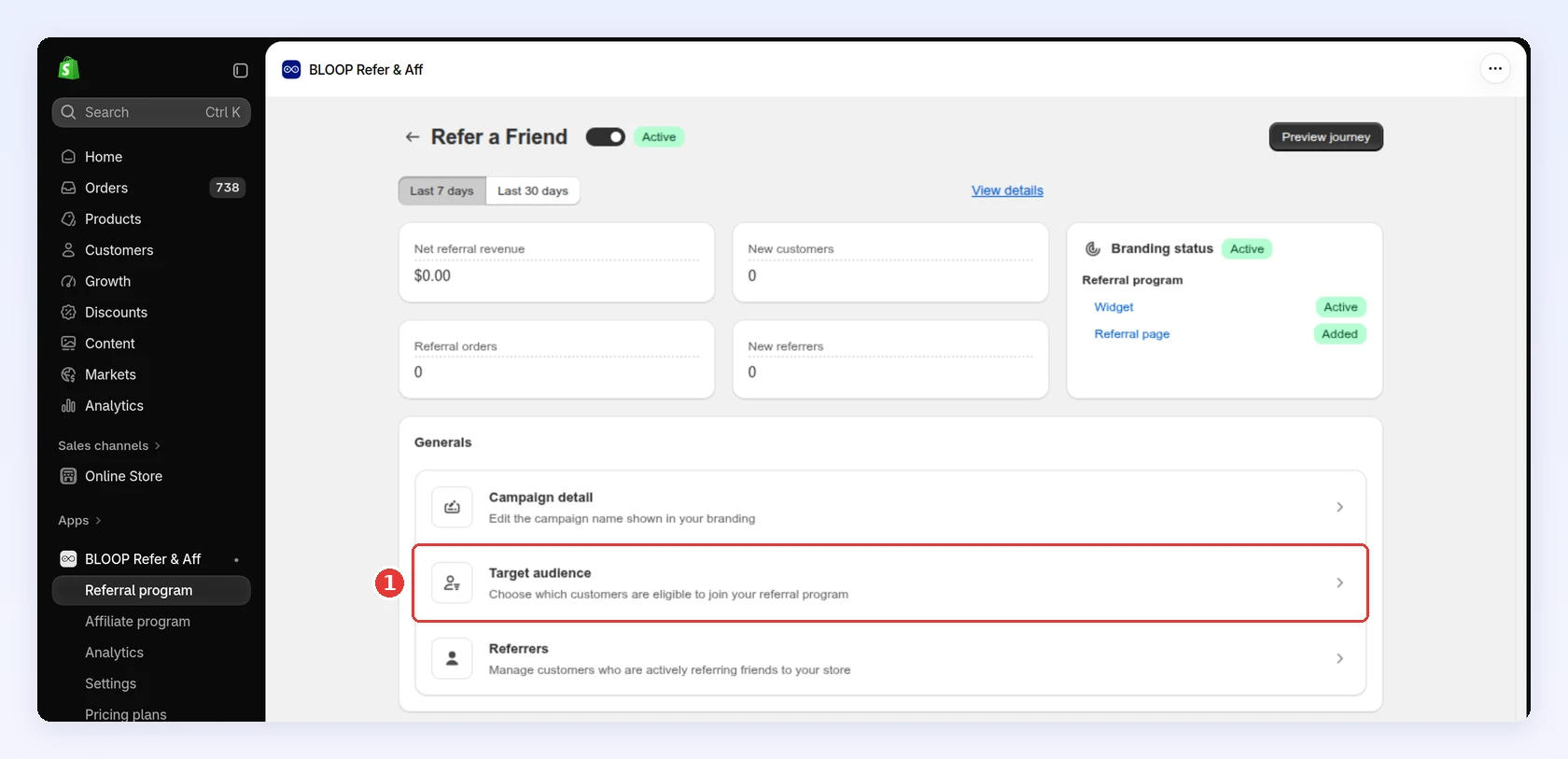
Not every customer makes an equally good advocate. Opening the program to everyone maximizes reach; restricting it to proven buyers or hand-picked fans raises trust per referral but reaches fewer people. Set this in the Target audience section of the Campaigns tab, under “Who can refer”. Bloop checks every widget interaction against this rule automatically.

The three audience options
Section titled “The three audience options”| Option | Who qualifies | Login required |
|---|---|---|
| All customers | Everyone, including guests | No |
| Members | Logged-in customers only | Yes |
| Customer segments | Customers in the Shopify segments you pick | Yes |
Anything more specific than “everyone” or “logged in” is expressed as a Shopify customer segment, built in Shopify admin under Customers → Segments. Segments are more expressive than a fixed list of options and they stay live — a customer who meets the condition tomorrow joins the audience tomorrow, with nothing to re-import.
| What you want | Shopify segment to build |
|---|---|
| Customers who have actually bought | number_of_orders >= 1 |
| A VIP or ambassador group | customer_tags CONTAINS 'VIP' |
| High spenders | amount_spent >= 500 |
| A named, curated list | customer_id IN (...) |
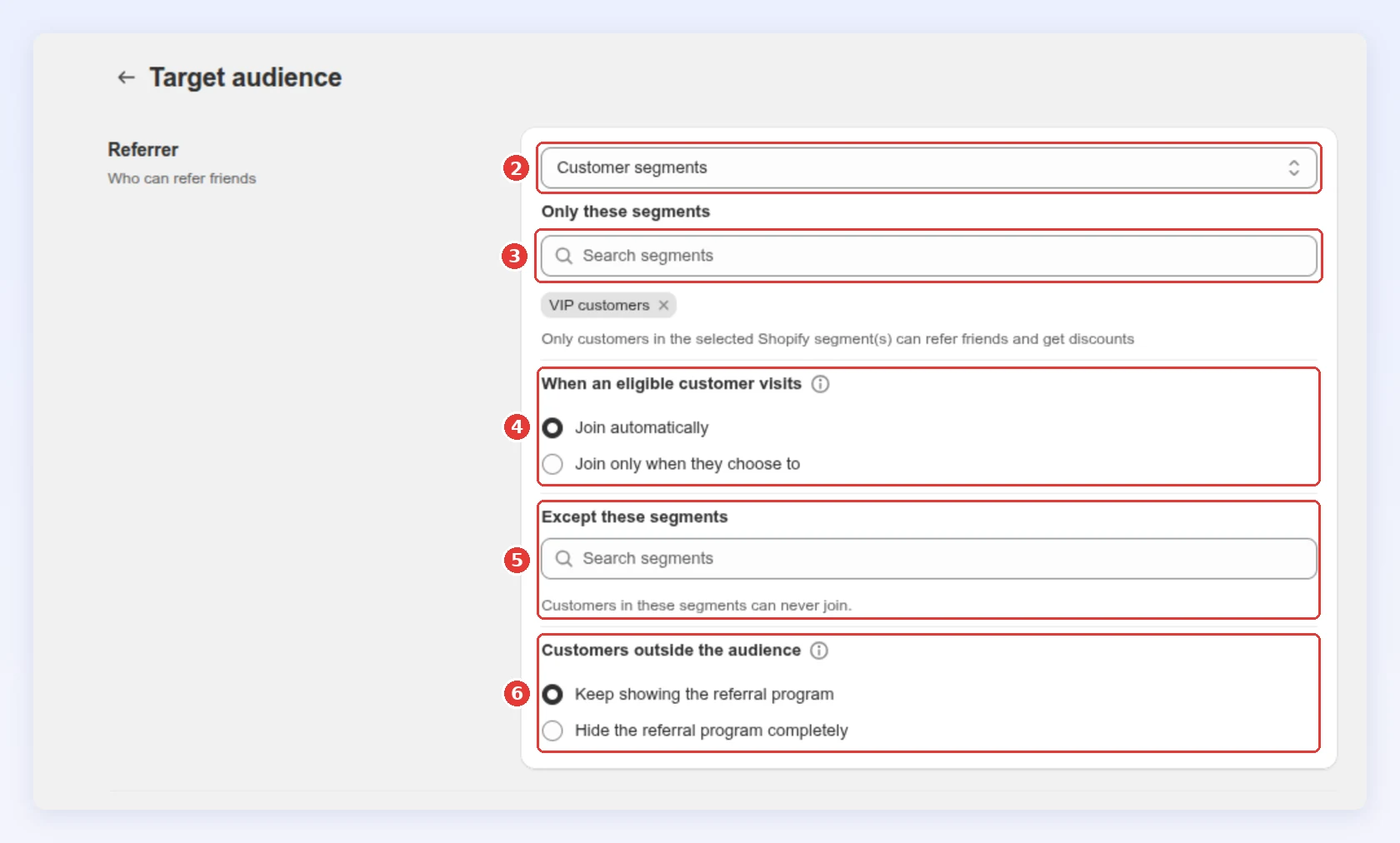
Choose Customer segments and pick at least one segment under Only these segments. If the picker is empty, you have no segments yet — create one in Shopify first.
Which to choose
Section titled “Which to choose”| Choose | When your goal is | Trade-off |
|---|---|---|
| All customers | Maximum reach — launch, growth pushes | Widest funnel, but includes people who’ve never bought |
| Customer segments (prior buyers) | Credible referrals at near-full reach | The sweet spot for most stores |
| Customer segments (VIP tag or spend) | A curated ambassador group | High trust, minimum reach |
| Members | Only logged-in, identifiable accounts | Cleaner data, but costs some guest shares |
For most stores, a segment of customers with at least one completed order is the strongest default — near-full reach, and every referrer has actually used the product.
Exclude specific segments
Section titled “Exclude specific segments”Except these segments is an optional second list. Customers in it can never join the campaign, even when they match the audience above. Use it to keep groups out of a program rather than to define who belongs in it:
- Wholesale or B2B accounts that shouldn’t be handed consumer discounts.
- Staff and test accounts.
- A segment already covered by a different, richer campaign.
A segment can’t be on both lists — targeted and excluded at once admits nobody, so Bloop blocks the save.
Hide the program from customers who don’t qualify
Section titled “Hide the program from customers who don’t qualify”By default, a logged-in customer who doesn’t qualify still sees the program where you installed it, for example a popup telling them they aren’t eligible. To remove it entirely, set Customers outside the audience to Hide the referral program completely. The default is Keep showing the referral program.
This setting appears once you choose Customer segments or add a segment under Except these segments. It applies only to logged-in customers: they no longer see the popup, launcher, customer account block or thank-you block. Guests still see the program so they can log in and be checked, and your referral page is not affected.
What happens when you change the audience
Section titled “What happens when you change the audience”Changing the audience — or the exclusion list — doesn’t only affect new joiners. Bloop reconciles the existing referrer list against the new rule:
- Referrers who no longer qualify are deactivated. Their link and code stop working; nothing already earned is taken away.
- People who already have a referrer account and now qualify are activated for this campaign. Other customers join the next time they use the program, so widening the audience doesn’t enrol your whole customer base at once.
Expect this to take a few minutes on a large customer base. Widen and narrow deliberately — flipping the audience back and forth churns referrer status each time.
Why the referrer’s trust is the whole point
Section titled “Why the referrer’s trust is the whole point”The referrer’s credibility is the value of the channel — a referral from someone who’s actually used your product carries real trust; one from a stranger gaming a discount carries none, and may cost you a payout for nothing. Referred customers are also measurably better: they churn less and carry higher lifetime value than customers acquired any other way (Schmitt, Skiera & Van den Bulte, Journal of Marketing, 2011). Your audience rule is the dial between reach and that trust.
Recommended audiences by industry
Section titled “Recommended audiences by industry”| Industry | Recommended audience | Why |
|---|---|---|
| Fashion & apparel | All customers | Maximum reach for fast-moving, social products |
| Subscription | Segment: active subscribers | Active subscribers make credible advocates |
| Beauty & cosmetics | Segment: VIP tag or repeat buyers | Loyal fans give recommendations real weight |
| Electronics & high-ticket | Segment: number_of_orders >= 1 |
Buyers who own the product give informed referrals |
| Wholesale / B2B | Segment of the accounts you choose | A known, controlled set of accounts |
Set your audience
Section titled “Set your audience”- Build the segment you need in Shopify admin under Customers → Segments, if you’re not using All customers or Members.
- Open Campaign → Target audience.
- Choose one of the three options under “Who can refer.”
- For Customer segments, add at least one segment under Only these segments.
- Optionally add segments under Except these segments.
- Save.
When to tighten the gate
Section titled “When to tighten the gate”Tighten only when a signal appears — not pre-emptively:
- Fraud or self-referral attempts → move to a segment of prior buyers.
- Referral quality is poor → require at least one completed order.
- You want a controlled ambassador program → point the audience at a VIP segment.
- Clean, account-level attribution matters more than reach → use Members.
A worked example
Section titled “A worked example”Illustrative, not measured data. A skincare brand launches with a Customer segments audience of number_of_orders >= 1. A month later, analytics show a small group of repeat buyers driving most referrals, so they build a VIP segment in Shopify, duplicate the campaign onto it with a richer reward, and add that VIP segment to Except these segments on the original campaign so nobody sits in both.
Who can be referred
Section titled “Who can be referred”The referee side is fixed: only first-time customers can be referred, so the incentive always targets new buyers.
- A friend who has already ordered from you can’t claim the friend reward.
- An existing customer who checks out with a referrer’s shared code doesn’t become a referral, and the referrer earns nothing for it.
- A customer who is already a referrer can’t be referred.
Bloop blocks self-referrals and other abuse automatically.
Common mistakes to avoid
Section titled “Common mistakes to avoid”- Starting narrow. A tight audience on day one hides who your real advocates are. Open wide, then tighten with data.
- Building the segment as a static customer list. A condition-based segment keeps admitting new qualifiers; a hand-picked list goes stale the day you save it.
- Restricting to Members without a reason. The login requirement quietly drops guest shares.
- Using exclusions to define the audience. Exclusions are a fence around an audience, not a substitute for choosing one.
- Tightening to fight fraud you don’t have. Bloop already blocks self-referrals — narrow the gate only when you see real abuse.
Next steps
Section titled “Next steps”- Decide what referrers and referees earn in Referrer and referee rewards.
- Choose how customers share in Referral methods.